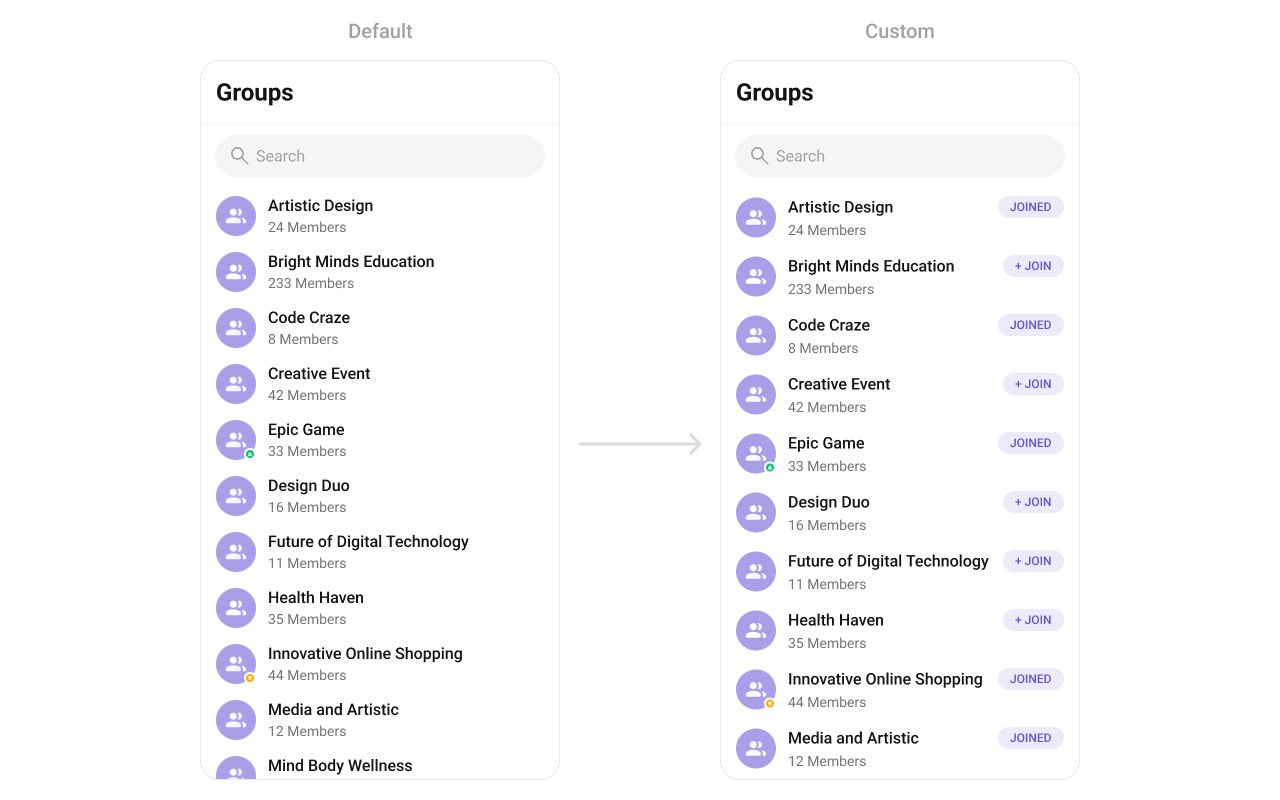
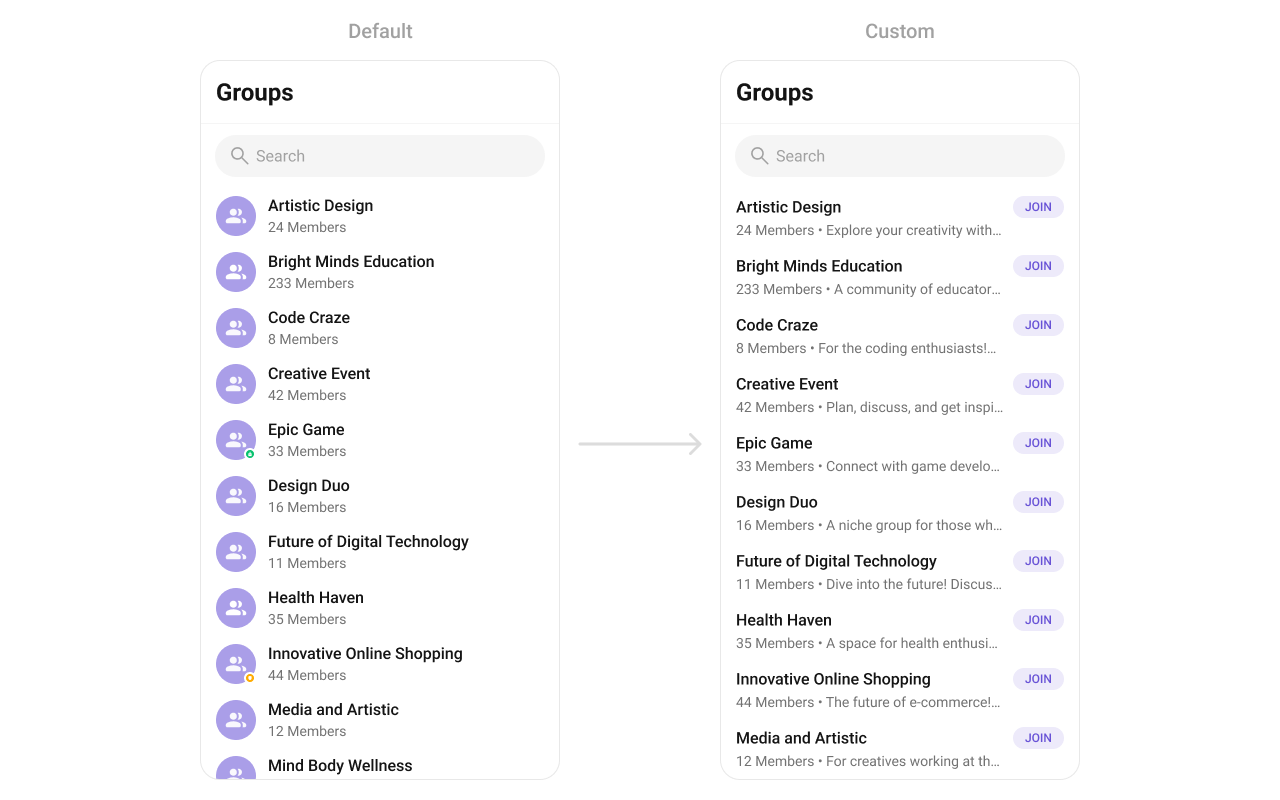
{
  "component": "CometChatGroups",
  "package": "com.cometchat.chatuikit.groups",
  "xmlElement": "<com.cometchat.chatuikit.groups.CometChatGroups />",
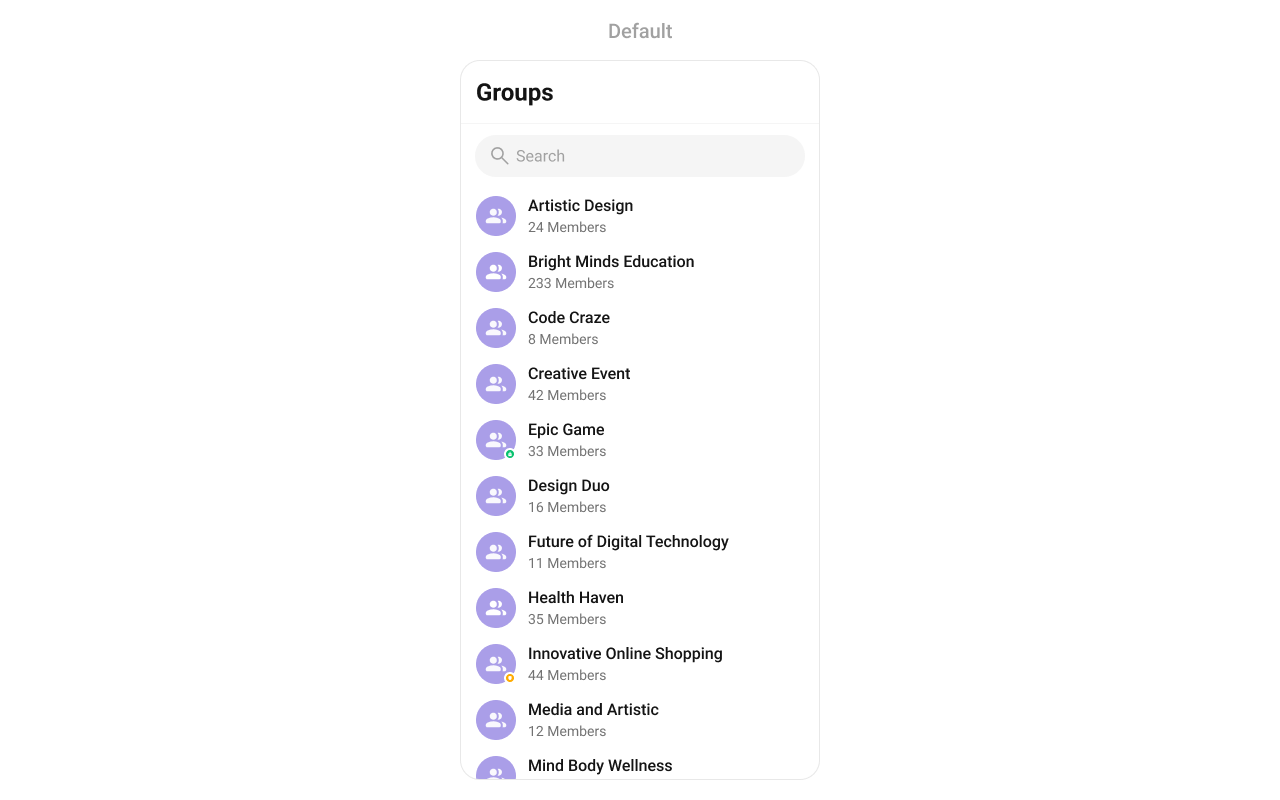
  "description": "Scrollable list of all available groups with search, avatars, names, and group type indicators (public, private, password-protected).",
  "primaryOutput": {
    "method": "setOnItemClick",
    "type": "OnItemClick<Group>"
  },
  "methods": {
    "data": {
      "setGroupsRequestBuilder": {
        "type": "GroupsRequest.GroupsRequestBuilder",
        "default": "SDK default",
        "note": "Pass the builder, not the result of .build()"
      },
      "setSearchRequestBuilder": {
        "type": "GroupsRequest.GroupsRequestBuilder",
        "default": "Same as main builder",
        "note": "Separate builder for search results"
      }
    },
    "callbacks": {
      "setOnItemClick": "OnItemClick<Group>",
      "setOnItemLongClick": "OnItemLongClick<Group>",
      "setOnBackPressListener": "OnBackPress",
      "setOnSelection": "OnSelection<Group>",
      "setOnError": "OnError",
      "setOnLoad": "OnLoad<Group>",
      "setOnEmpty": "OnEmpty"
    },
    "visibility": {
      "setBackIconVisibility": { "type": "int (View.VISIBLE | View.GONE)", "default": "View.GONE" },
      "setToolbarVisibility": { "type": "int", "default": "View.VISIBLE" },
      "setLoadingStateVisibility": { "type": "int", "default": "View.VISIBLE" },
      "setErrorStateVisibility": { "type": "int", "default": "View.VISIBLE" },
      "setEmptyStateVisibility": { "type": "int", "default": "View.VISIBLE" },
      "setSeparatorVisibility": { "type": "int", "default": "View.VISIBLE" },
      "setGroupTypeVisibility": { "type": "int", "default": "View.VISIBLE" },
      "setSearchBoxVisibility": { "type": "int", "default": "View.VISIBLE" }
    },
    "selection": {
      "setSelectionMode": {
        "type": "UIKitConstants.SelectionMode",
        "values": ["NONE", "SINGLE", "MULTIPLE"],
        "default": "NONE"
      }
    },
    "viewSlots": {
      "setItemView": "GroupsViewHolderListener — entire list item row",
      "setLeadingView": "GroupsViewHolderListener — avatar / left section",
      "setTitleView": "GroupsViewHolderListener — name / title text",
      "setSubtitleView": "GroupsViewHolderListener — subtitle text below name",
      "setTrailingView": "GroupsViewHolderListener — right section",
      "setLoadingView": "@LayoutRes int — loading spinner",
      "setEmptyView": "@LayoutRes int — empty state",
      "setErrorView": "@LayoutRes int — error state",
      "setOverflowMenu": "View — toolbar menu",
      "setOptions": "Function2<Context, Group, List<MenuItem>> — long-press context menu (replaces defaults)",
      "addOptions": "Function2<Context, Group, List<MenuItem>> — long-press context menu (appends to defaults)"
    },
    "advanced": {
      "selectGroup": "Group, SelectionMode — programmatic selection",
      "clearSelection": "void — clears all selected groups",
      "getSelectedGroups": "List<Group> — returns selected items",
      "setSearchKeyword": "String — programmatic search",
      "setTitleText": "String — custom toolbar title",
      "setSearchPlaceholderText": "String — search placeholder",
      "getBinding": "CometchatGroupListBinding — root ViewBinding",
      "getViewModel": "GroupsViewModel — internal ViewModel access",
      "getAdapter": "GroupsAdapter — internal adapter access",
      "setAdapter": "GroupsAdapter — replace the default adapter"
    },
    "style": {
      "setStyle": {
        "type": "@StyleRes int",
        "parent": "CometChatGroupsStyle"
      }
    }
  },
  "events": [
    {
      "name": "CometChatGroupEvents.ccGroupCreated",
      "payload": "Group",
      "description": "Logged-in user created a group"
    },
    {
      "name": "CometChatGroupEvents.ccGroupDeleted",
      "payload": "Group",
      "description": "Logged-in user deleted a group"
    },
    {
      "name": "CometChatGroupEvents.ccGroupLeft",
      "payload": "Action, User, Group",
      "description": "Logged-in user left a group"
    },
    {
      "name": "CometChatGroupEvents.ccGroupMemberJoined",
      "payload": "User, Group",
      "description": "Logged-in user joined a group"
    },
    {
      "name": "CometChatGroupEvents.ccGroupMemberAdded",
      "payload": "List<Action>, List<User>, Group, User",
      "description": "Logged-in user added members to a group"
    },
    {
      "name": "CometChatGroupEvents.ccGroupMemberKicked",
      "payload": "Action, User, User, Group",
      "description": "Logged-in user kicked a member from a group"
    },
    {
      "name": "CometChatGroupEvents.ccGroupMemberBanned",
      "payload": "Action, User, User, Group",
      "description": "Logged-in user banned a member from a group"
    },
    {
      "name": "CometChatGroupEvents.ccGroupMemberUnBanned",
      "payload": "Action, User, User, Group",
      "description": "Logged-in user unbanned a member from a group"
    },
    {
      "name": "CometChatGroupEvents.ccGroupMemberScopeChanged",
      "payload": "Action, User, String, String, Group",
      "description": "Logged-in user changed a member's scope"
    },
    {
      "name": "CometChatGroupEvents.ccOwnershipChanged",
      "payload": "Group, GroupMember",
      "description": "Logged-in user transferred group ownership"
    }
  ],
  "sdkListeners": [
    "onGroupMemberJoined",
    "onGroupMemberLeft",
    "onGroupMemberKicked",
    "onGroupMemberBanned",
    "onGroupMemberUnbanned",
    "onGroupMemberScopeChanged",
    "onMemberAddedToGroup"
  ]
}

Where It Fits

CometChatGroups is a list component. It renders all available groups and emits the selected Group via setOnItemClick. Wire it to CometChatMessageHeader, CometChatMessageList, and CometChatMessageComposer to build a group messaging layout.
ChatActivity.kt
class ChatActivity : AppCompatActivity() {

    private lateinit var groups: CometChatGroups
    private lateinit var messageHeader: CometChatMessageHeader
    private lateinit var messageList: CometChatMessageList
    private lateinit var messageComposer: CometChatMessageComposer

    override fun onCreate(savedInstanceState: Bundle?) {
        super.onCreate(savedInstanceState)
        setContentView(R.layout.activity_chat)

        groups = findViewById(R.id.groups)
        messageHeader = findViewById(R.id.message_header)
        messageList = findViewById(R.id.message_list)
        messageComposer = findViewById(R.id.message_composer)

        groups.setOnItemClick { view, position, group ->
            messageHeader.setGroup(group)
            messageList.setGroup(group)
            messageComposer.setGroup(group)
        }
    }
}

Quick Start

Add the component to your layout XML:
layout_activity.xml
<com.cometchat.chatuikit.groups.CometChatGroups
    android:id="@+id/groups"
    android:layout_height="match_parent"
    android:layout_width="match_parent" />
Prerequisites: CometChat SDK initialized with CometChatUIKit.init(), a user logged in, and the cometchat-chat-uikit-android dependency added. To add programmatically in an Activity:
YourActivity.kt
override fun onCreate(savedInstanceState: Bundle?) {
    super.onCreate(savedInstanceState)
    setContentView(CometChatGroups(this))
}
Or in a Fragment:
YourFragment.kt
override fun onCreateView(inflater: LayoutInflater, container: ViewGroup?, savedInstanceState: Bundle?): View {
    return CometChatGroups(requireContext())
}

Filtering Groups

Pass a GroupsRequest.GroupsRequestBuilder to setGroupsRequestBuilder. Pass the builder instance — not the result of .build().
val builder = GroupsRequestBuilder()
    .setLimit(10)
    .joinedOnly(true)
cometchatGroups.setGroupsRequestBuilder(builder)

Filter Recipes

RecipeCode
Joined onlybuilder.joinedOnly(true)
Limit to 10 per pagebuilder.setLimit(10)
Search by keywordbuilder.setSearchKeyWord("design")
Filter by tagsbuilder.setTags(Arrays.asList("vip"))
With tagsbuilder.withTags(true)
The component uses infinite scroll — the next page loads as the user scrolls to the bottom. Refer to GroupsRequestBuilder for the full builder API.

Search Request Builder

Use setSearchRequestBuilder to customize the search list separately from the main list:
val searchBuilder = GroupsRequestBuilder()
    .setLimit(10)
    .setSearchKeyWord("**")
cometchatGroups.setSearchRequestBuilder(searchBuilder)

Actions and Events

Callback Methods

setOnItemClick

Fires when a group row is tapped. Primary navigation hook — set the active group and render the message view.
YourActivity.kt
cometchatGroups.onItemClick = OnItemClick { view, position, group ->
            
}
What this does: Replaces the default item-click behavior. When a user taps a group, your custom lambda executes instead of the built-in navigation.

setOnItemLongClick

Fires when a group row is long-pressed. Use for additional actions like delete or leave.
YourActivity.kt
cometchatGroups.onItemLongClick = OnItemLongClick({ view, position, group ->
            
})

setOnBackPressListener

Fires when the user presses the back button in the app bar. Default: navigates to the previous activity.
YourActivity.kt
cometchatGroups.onBackPressListener = OnBackPress {

}

setOnSelection

Fires when a group is checked/unchecked in multi-select mode. Requires setSelectionMode to be set.
YourActivity.kt
cometchatGroups.setOnSelection(object : OnSelection<Group?> {
    override fun onSelection(t: MutableList<Group?>?) {
                
    }
})

setOnError

Fires on internal errors (network failure, auth issue, SDK exception).
YourActivity.kt
cometchatGroups.setOnError {

}

setOnLoad

Fires when the list is successfully fetched and loaded.
YourActivity.kt
cometchatGroups.setOnLoad(object : OnLoad<Group?> {
    override fun onLoad(list: MutableList<Group?>?) {

    }
})

setOnEmpty

Fires when the list is empty, enabling custom handling such as showing a placeholder.
YourActivity.kt
cometchatGroups.setOnEmpty {
            
}
  • Verify: After setting an action callback, trigger the corresponding user interaction (tap, long-press, back, select) and confirm your custom logic executes instead of the default behavior.

Global UI Events

CometChatGroupEvents emits events subscribable from anywhere in the application. Add a listener and remove it when no longer needed.
EventFires whenPayload
ccGroupCreatedThe logged-in user creates a groupGroup
ccGroupDeletedThe logged-in user deletes a groupGroup
ccGroupLeftThe logged-in user leaves a groupAction, User, Group
ccGroupMemberJoinedThe logged-in user joins a groupUser, Group
ccGroupMemberAddedThe logged-in user adds members to a groupList<Action>, List<User>, Group, User
ccGroupMemberKickedThe logged-in user kicks a memberAction, User, User, Group
ccGroupMemberBannedThe logged-in user bans a memberAction, User, User, Group
ccGroupMemberUnBannedThe logged-in user unbans a memberAction, User, User, Group
ccGroupMemberScopeChangedThe logged-in user changes a member’s scopeAction, User, String, String, Group
ccOwnershipChangedThe logged-in user transfers group ownershipGroup, GroupMember
Add Listener
CometChatGroupEvents.addGroupListener("LISTENER_TAG", object : CometChatGroupEvents() {
    override fun ccGroupCreated(group: Group?) {
        super.ccGroupCreated(group)
    }

    override fun ccGroupDeleted(group: Group?) {
        super.ccGroupDeleted(group)
    }

    override fun ccGroupLeft(actionMessage: Action?, leftUser: User?, leftGroup: Group?) {
        super.ccGroupLeft(actionMessage, leftUser, leftGroup)
    }

    override fun ccGroupMemberJoined(joinedUser: User?, joinedGroup: Group?) {
        super.ccGroupMemberJoined(joinedUser, joinedGroup)
    }

    override fun ccGroupMemberAdded(
        actionMessages: List<Action?>?,
        usersAdded: List<User?>?,
        userAddedIn: Group?,
        addedBy: User?
    ) {
        super.ccGroupMemberAdded(actionMessages, usersAdded, userAddedIn, addedBy)
    }

    override fun ccGroupMemberKicked(
        actionMessage: Action?,
        kickedUser: User?,
        kickedBy: User?,
        kickedFrom: Group?
    ) {
        super.ccGroupMemberKicked(actionMessage, kickedUser, kickedBy, kickedFrom)
    }

    override fun ccGroupMemberBanned(
        actionMessage: Action?,
        bannedUser: User?,
        bannedBy: User?,
        bannedFrom: Group?
    ) {
        super.ccGroupMemberBanned(actionMessage, bannedUser, bannedBy, bannedFrom)
    }

    override fun ccGroupMemberUnBanned(
        actionMessage: Action?,
        unbannedUser: User?,
        unBannedBy: User?,
        unBannedFrom: Group?
    ) {
        super.ccGroupMemberUnBanned(actionMessage, unbannedUser, unBannedBy, unBannedFrom)
    }

    override fun ccGroupMemberScopeChanged(
        actionMessage: Action?,
        updatedUser: User?,
        scopeChangedTo: String?,
        scopeChangedFrom: String?,
        group: Group?
    ) {
        super.ccGroupMemberScopeChanged(
            actionMessage,
            updatedUser,
            scopeChangedTo,
            scopeChangedFrom,
            group
        )
    }

    override fun ccOwnershipChanged(group: Group?, newOwner: GroupMember?) {
        super.ccOwnershipChanged(group, newOwner)
    }
})
Remove Listener
CometChatGroupEvents.removeListeners()

SDK Events (Real-Time, Automatic)

The component listens to these SDK events internally. No manual attachment needed unless additional side effects are required.
SDK ListenerInternal behavior
onGroupMemberJoinedUpdates the group list when a member joins
onGroupMemberLeftUpdates the group list when a member leaves
onGroupMemberKickedUpdates the group list when a member is kicked
onGroupMemberBannedUpdates the group list when a member is banned
onGroupMemberUnbannedUpdates the group list when a member is unbanned
onGroupMemberScopeChangedUpdates the group list when a member’s scope changes
onMemberAddedToGroupUpdates the group list when members are added
Automatic: group membership changes update the list in real time.

Functionality

Small functional customizations such as toggling visibility of UI elements and configuring selection modes.
MethodsDescriptionCode
setBackIconVisibilityToggles visibility for the back button in the app bar.setBackIconVisibility(View.VISIBLE);
setToolbarVisibilityToggles visibility for the toolbar in the app bar.setToolbarVisibility(View.GONE);
setLoadingStateVisibilityHides the loading state while fetching groups.setLoadingStateVisibility(View.GONE);
setErrorStateVisibilityHides the error state on fetching groups.setErrorStateVisibility(View.GONE);
setEmptyStateVisibilityHides the empty state on fetching groups.setEmptyStateVisibility(View.GONE);
setSeparatorVisibilityControls visibility of separators in the list view.setSeparatorVisibility(View.GONE);
setGroupTypeVisibilityControls visibility of the group type indicator (public, private, password).setGroupTypeVisibility(View.GONE);
setSearchBoxVisibilityControls visibility of the search box in the toolbar.setSearchBoxVisibility(View.GONE);
setSelectionModeDetermines the selection mode (single or multiple).setSelectionMode(UIKitConstants.SelectionMode.MULTIPLE);
setSearchKeywordProgrammatically triggers a search with the given keyword.setSearchKeyword("design");
setTitleTextSets a custom title in the toolbar.setTitleText("My Groups");
setTitleVisibilityToggles visibility for the title text in the toolbar.setTitleVisibility(View.GONE);
setSearchPlaceholderTextSets the placeholder text for the search input.setSearchPlaceholderText("Find groups...");
  • Verify: After calling a visibility method, confirm the corresponding UI element is shown or hidden.

Custom View Slots

Each slot replaces a section of the default UI. Slots that accept a Group parameter receive the group object for that row via the GroupsViewHolderListener pattern (createView + bindView).
SlotMethodReplaces
Leading viewsetLeadingView(GroupsViewHolderListener)Avatar / left section
Title viewsetTitleView(GroupsViewHolderListener)Name / title text
Subtitle viewsetSubtitleView(GroupsViewHolderListener)Subtitle text below name
Trailing viewsetTrailingView(GroupsViewHolderListener)Right section
Item viewsetItemView(GroupsViewHolderListener)Entire list item row
Loading viewsetLoadingView(@LayoutRes int)Loading spinner
Empty viewsetEmptyView(@LayoutRes int)Empty state
Error viewsetErrorView(@LayoutRes int)Error state
Overflow menusetOverflowMenu(View)Toolbar menu
Options (replace)setOptions(Function2)Long-press context menu (replaces defaults)
Options (append)addOptions(Function2)Long-press context menu (appends to defaults)

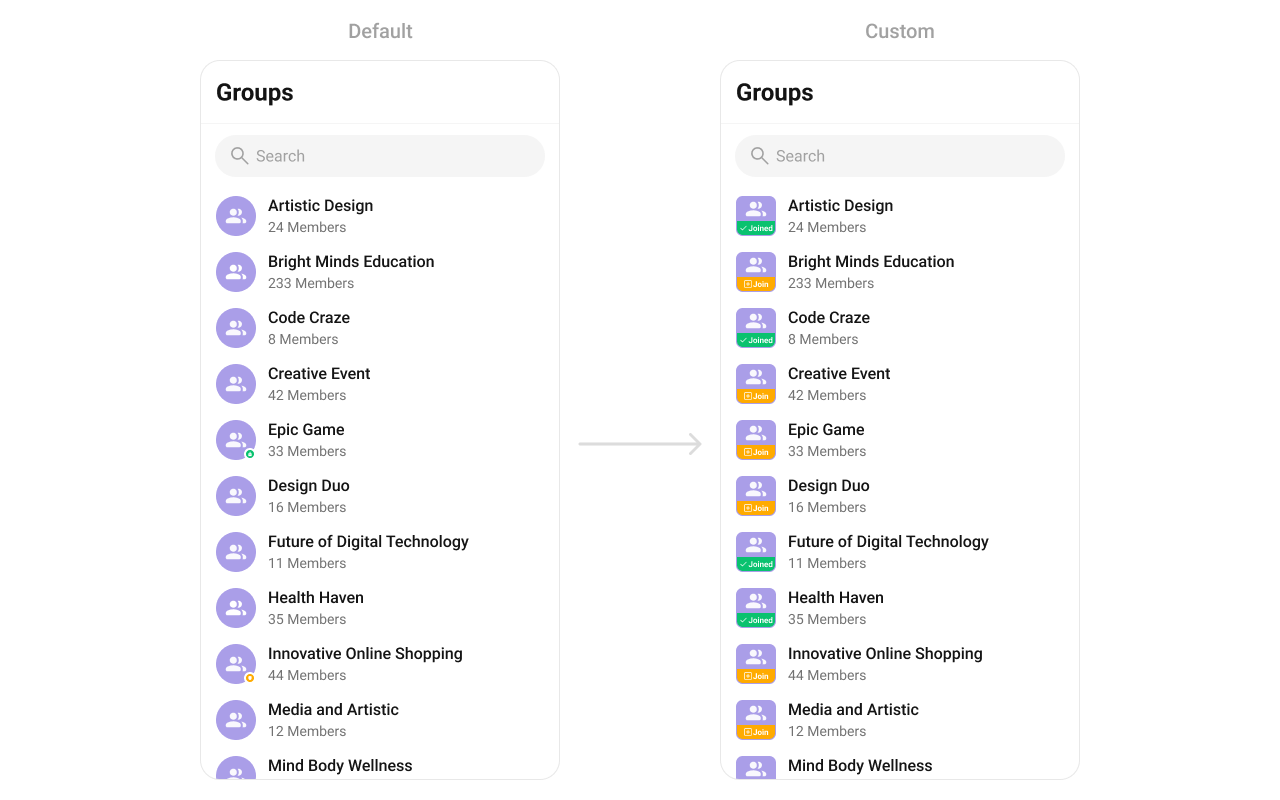
setLeadingView

Replace the avatar / left section.
cometchatGroups.setLeadingView(object : GroupsViewHolderListener() {
    override fun createView(
        context: Context?,
        listItem: CometchatListBaseItemsBinding?
    ): View? {
        return null
    }

    override fun bindView(
        context: Context,
        createdView: View,
        group: Group,
        holder: RecyclerView.ViewHolder,
        groupList: List<Group>,
        position: Int
    ) {
    }
})
What this does: Registers a GroupsViewHolderListener that provides a custom view for the leading (left) area of each group item. createView inflates your layout, and bindView populates it with group data.
Join status badge example:
Create a custom_leading_avatar_view.xml layout:
custom_leading_avatar_view.xml
<?xml version="1.0" encoding="utf-8"?>
<LinearLayout xmlns:android="http://schemas.android.com/apk/res/android"
    android:id="@+id/leading_avatar_view"
    android:layout_width="@dimen/cometchat_40dp"
    android:layout_height="@dimen/cometchat_40dp"
    android:background="@drawable/group_leading_joined"
    android:orientation="vertical">

</LinearLayout>
cometchatGroups.setLeadingView(object : GroupsViewHolderListener() {
    override fun createView(context: Context?, listItem: CometchatListBaseItemsBinding?): View {
        return LayoutInflater.from(context).inflate(R.layout.custom_leading_avatar_view, null)
    }

    override fun bindView(
        context: Context,
        createdView: View,
        group: Group,
        holder: RecyclerView.ViewHolder,
        groupList: List<Group>,
        position: Int
    ) {
        val groupAvatar = createdView.findViewById<LinearLayout>(R.id.leading_avatar_view)
        groupAvatar.background = if (group.isJoined) ResourcesCompat.getDrawable(
            resources,
            R.drawable.group_leading_joined,
            null
        ) else ResourcesCompat.getDrawable(
            resources,
            R.drawable.group_leading_join,
            null
        )
        groupAvatar.setOnLongClickListener { v: View? ->
            if (group.isJoined) {
                Toast.makeText(context, "Group already joined", Toast.LENGTH_SHORT).show()
            } else {
                Toast.makeText(context, "Joining group", Toast.LENGTH_SHORT).show()
            }
            true
        }
    }
})

setTitleView

Replace the name / title text.
cometchatGroups.setTitleView(object : GroupsViewHolderListener() {
    override fun createView(
        context: Context?,
        listItem: CometchatListBaseItemsBinding?
    ): View? {
        return null
    }

    override fun bindView(
        context: Context,
        createdView: View,
        group: Group,
        holder: RecyclerView.ViewHolder,
        groupList: List<Group>,
        position: Int
    ) {
    }
})
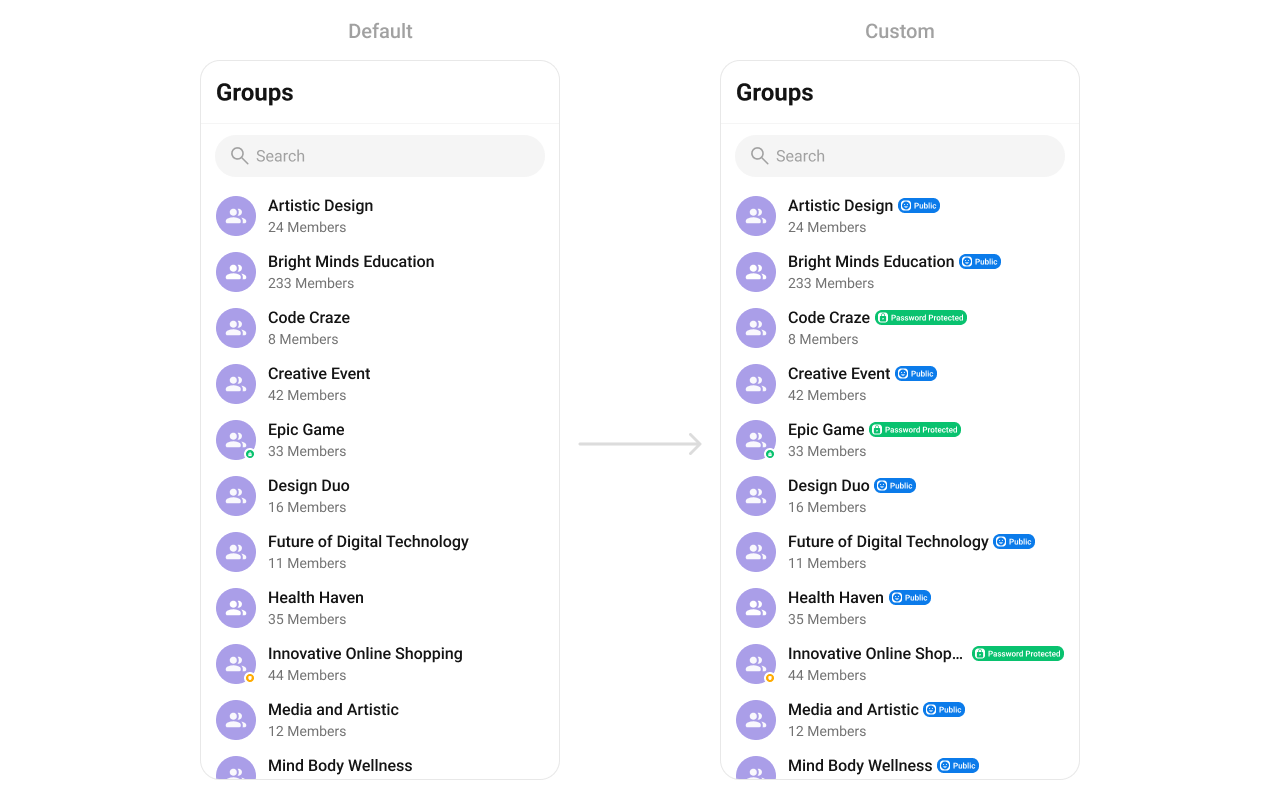
Group type icon example:
Create a custom_group_title_view.xml layout:
custom_group_title_view.xml
<?xml version="1.0" encoding="utf-8"?>
<LinearLayout xmlns:android="http://schemas.android.com/apk/res/android"
    android:id="@+id/user_layout"
    android:layout_width="wrap_content"
    android:layout_height="wrap_content"
    android:gravity="center_vertical"
    android:orientation="horizontal">

    <TextView
        android:id="@+id/title"
        android:layout_width="wrap_content"
        android:layout_height="wrap_content"
        android:layout_weight="1"
        android:text="teacher"
        android:textAppearance="?attr/cometchatTextAppearanceHeading4Medium" />

    <View
        android:id="@+id/type"
        android:layout_width="wrap_content"
        android:layout_height="15dp"
        android:layout_marginStart="@dimen/cometchat_16dp"
         />

</LinearLayout>
cometchatGroups.setTitleView(object : GroupsViewHolderListener() {
    override fun createView(context: Context?, listItem: CometchatListBaseItemsBinding?): View {
        return LayoutInflater.from(context).inflate(R.layout.custom_group_title_view, null)
    }

    override fun bindView(
        context: Context,
        createdView: View,
        group: Group,
        holder: RecyclerView.ViewHolder,
        groupList: List<Group>,
        position: Int
    ) {
        val layout = createdView.findViewById<LinearLayout>(R.id.group_layout)
        val layoutParams = LinearLayout.LayoutParams(
            ViewGroup.LayoutParams.WRAP_CONTENT,
            ViewGroup.LayoutParams.WRAP_CONTENT
        )
        layout.layoutParams = layoutParams
        val name = createdView.findViewById<TextView>(R.id.title)
        name.text = group.name
        val type = createdView.findViewById<View>(R.id.type)
        if (CometChatConstants.GROUP_TYPE_PUBLIC == group.groupType) {
            type.visibility = View.VISIBLE
            type.background = ResourcesCompat.getDrawable(resources, R.drawable.public_icon, null)
        } else if (CometChatConstants.GROUP_TYPE_PASSWORD == group.groupType) {
            type.visibility = View.VISIBLE
            type.background = ResourcesCompat.getDrawable(resources, R.drawable.passowrd_icon, null)
        } else if (CometChatConstants.GROUP_TYPE_PRIVATE == group.groupType) {
            type.visibility = View.VISIBLE
            type.background = ResourcesCompat.getDrawable(resources, R.drawable.private_icon, null)
        } else {
            type.visibility = View.GONE
        }
    }
})

setSubtitleView

Replace the subtitle text below the group’s name.
cometchatGroups.setSubtitleView(object : GroupsViewHolderListener() {
    override fun createView(
        context: Context?,
        listItem: CometchatListBaseItemsBinding?
    ): View? {
        return null
    }

    override fun bindView(
        context: Context,
        createdView: View,
        group: Group,
        holder: RecyclerView.ViewHolder,
        groupList: List<Group>,
        position: Int
    ) {
    }
})
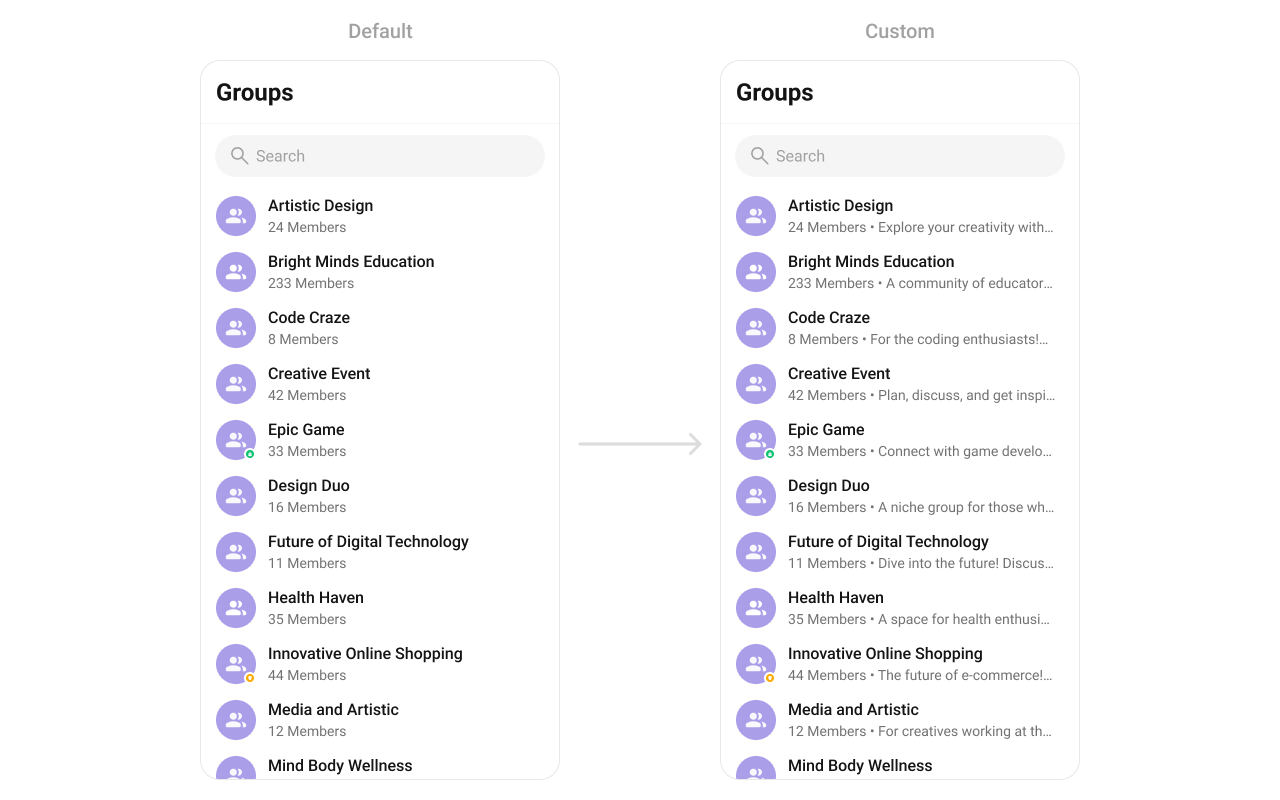
Example with member count and description:
YourActivity.kt
cometchatGroups.setSubtitleView(object : GroupsViewHolderListener() {
    override fun createView(
        context: Context?,
        listItem: CometchatListBaseItemsBinding?
    ): View {
        return TextView(context)
    }

    override fun bindView(
        context: Context,
        createdView: View,
        group: Group,
        holder: RecyclerView.ViewHolder,
        groupList: List<Group>,
        position: Int
    ) {
        val textView = createdView as TextView
        textView.text =
            if (group.membersCount > 1) group.membersCount.toString() + " members" else group.membersCount.toString() + " member" + " • " + group.description
    }
})

setTrailingView

Replace the right section of each group item.
cometchatGroups.setTrailingView(object : GroupsViewHolderListener() {
    override fun createView(
        context: Context?,
        listItem: CometchatListBaseItemsBinding?
    ): View? {
        return null
    }

    override fun bindView(
        context: Context,
        createdView: View,
        group: Group,
        holder: RecyclerView.ViewHolder,
        groupList: List<Group>,
        position: Int
    ) {
    }
})
Join button example:
Create a custom_tail_view.xml layout:
custom_tail_view.xml
<?xml version="1.0" encoding="utf-8"?>
<LinearLayout xmlns:android="http://schemas.android.com/apk/res/android"
    xmlns:app="http://schemas.android.com/apk/res-auto"
    android:layout_width="wrap_content"
    android:layout_height="wrap_content"
    android:gravity="center_vertical"
    android:orientation="horizontal">

    <com.google.android.material.button.MaterialButton
        android:id="@+id/button"
        android:layout_width="wrap_content"
        android:layout_height="wrap_content"
        android:backgroundTint="#EDEAFA"
        android:text="+ joined"
        android:textStyle="bold"
        android:textAppearance="?attr/cometchatTextAppearanceCaption2Regular"
        android:textAllCaps="true"
        android:textColor="#6852D6"
        app:cornerRadius="@dimen/cometchat_1000dp" />
</LinearLayout>
cometchatGroups.setTrailingView(object : GroupsViewHolderListener() {
    override fun createView(context: Context?, listItem: CometchatListBaseItemsBinding?): View {
        return LayoutInflater.from(context).inflate(R.layout.custom_tail_view, null)
    }

    override fun bindView(
        context: Context,
        createdView: View,
        group: Group,
        holder: RecyclerView.ViewHolder,
        groupList: List<Group>,
        position: Int
    ) {
        val button = createdView.findViewById<MaterialButton>(R.id.button)
        button.text = (if (group.isJoined) "Joined" else "+ Join")
    }
})

setItemView

Replace the entire list item row.
cometchatGroups.setItemView(object : GroupsViewHolderListener() {
    override fun createView(
        context: Context?,
        listItem: CometchatListBaseItemsBinding?
    ): View? {
        return null
    }

    override fun bindView(
        context: Context,
        createdView: View,
        group: Group,
        holder: RecyclerView.ViewHolder,
        groupList: List<Group>,
        position: Int
    ) {
    }
})
Custom list item example:
Create a custom_group_list_item.xml layout:
custom_group_list_item.xml
<?xml version="1.0" encoding="utf-8"?>
<LinearLayout xmlns:android="http://schemas.android.com/apk/res/android"
    xmlns:app="http://schemas.android.com/apk/res-auto"
    android:layout_width="match_parent"
    android:layout_height="wrap_content"
    android:orientation="vertical">

    <LinearLayout
        android:layout_width="match_parent"
        android:layout_height="wrap_content"
        android:orientation="horizontal">

        <TextView
            android:id="@+id/tvName"
            android:layout_width="0dp"
            android:layout_weight="1"
            android:layout_height="wrap_content"
            android:maxLines="1"
            android:textAppearance="?attr/cometchatTextAppearanceHeading4Bold"
            android:textColor="?attr/cometchatTextColorPrimary" />

        <com.google.android.material.card.MaterialCardView
            android:layout_width="wrap_content"
            android:layout_height="wrap_content"
            android:layout_marginStart="@dimen/cometchat_16dp"
            android:layout_marginTop="@dimen/cometchat_2dp"
            android:layout_marginBottom="@dimen/cometchat_2dp"
            android:elevation="0dp"
            app:cardBackgroundColor="#EDEAFA"
            app:cardCornerRadius="@dimen/cometchat_radius_max"
            app:cardElevation="0dp">

            <TextView
                android:layout_width="wrap_content"
                android:layout_height="wrap_content"
                android:layout_marginStart="@dimen/cometchat_margin_3"
                android:layout_marginTop="@dimen/cometchat_margin_1"
                android:layout_marginEnd="@dimen/cometchat_margin_3"
                android:layout_marginBottom="@dimen/cometchat_margin_1"
                android:text="JOIN"
                android:textAppearance="@style/CometChatTextAppearanceCaption1.Medium"
                android:textColor="?attr/cometchatPrimaryColor" />
        </com.google.android.material.card.MaterialCardView>
    </LinearLayout>

    <TextView
        android:id="@+id/tvSubtitle"
        android:layout_width="match_parent"
        android:layout_height="wrap_content"
        android:layout_marginTop="@dimen/cometchat_margin_1"
        android:textAppearance="?attr/cometchatTextAppearanceBodyRegular"
        android:textColor="?attr/cometchatTextColorSecondary" />
</LinearLayout>
YourActivity.kt
cometchatGroups.setItemView(object : GroupsViewHolderListener() {
    override fun createView(
        context: Context?,
        listItem: CometchatListBaseItemsBinding?
    ): View {
        return View.inflate(context, R.layout.custom_group_list_item, null)
    }

    override fun bindView(
        context: Context,
        createdView: View,
        group: Group,
        holder: RecyclerView.ViewHolder,
        groupList: List<Group>,
        position: Int
    ) {
        val groupName = createdView.findViewById<TextView>(R.id.tvName)
        val groupMemberCount = createdView.findViewById<TextView>(R.id.tvSubtitle)
        val params = LinearLayout.LayoutParams(
            LinearLayout.LayoutParams.MATCH_PARENT,
            LinearLayout.LayoutParams.WRAP_CONTENT
        )
        createdView.layoutParams = params
        groupName.text = group.name
        groupMemberCount.text =
            if (group.membersCount > 1) group.membersCount.toString() + " members" else group.membersCount.toString() + " member" + " • " + group.description
    }
})

setOptions

Replace the long-press context menu entirely.
cometchatGroups.options = Function2<Context?, Group?, List<CometChatPopupMenu.MenuItem?>?> { context, group -> emptyList<CometChatPopupMenu.MenuItem?>() }

addOptions

Append to the long-press context menu without removing defaults.
cometchatGroups.addOptions { context, group -> emptyList<CometChatPopupMenu.MenuItem?>() }

setLoadingView

Sets a custom loading view displayed when data is being fetched.
cometchatGroups.loadingView = R.layout.your_loading_view

setEmptyView

Configures a custom view displayed when there are no groups in the list.
cometchatGroups.emptyView = R.layout.your_empty_view

setErrorView

Defines a custom error state view that appears when an issue occurs while loading groups.
cometchatGroups.errorView = R.layout.your_error_view

setOverflowMenu

Replace the toolbar overflow menu.
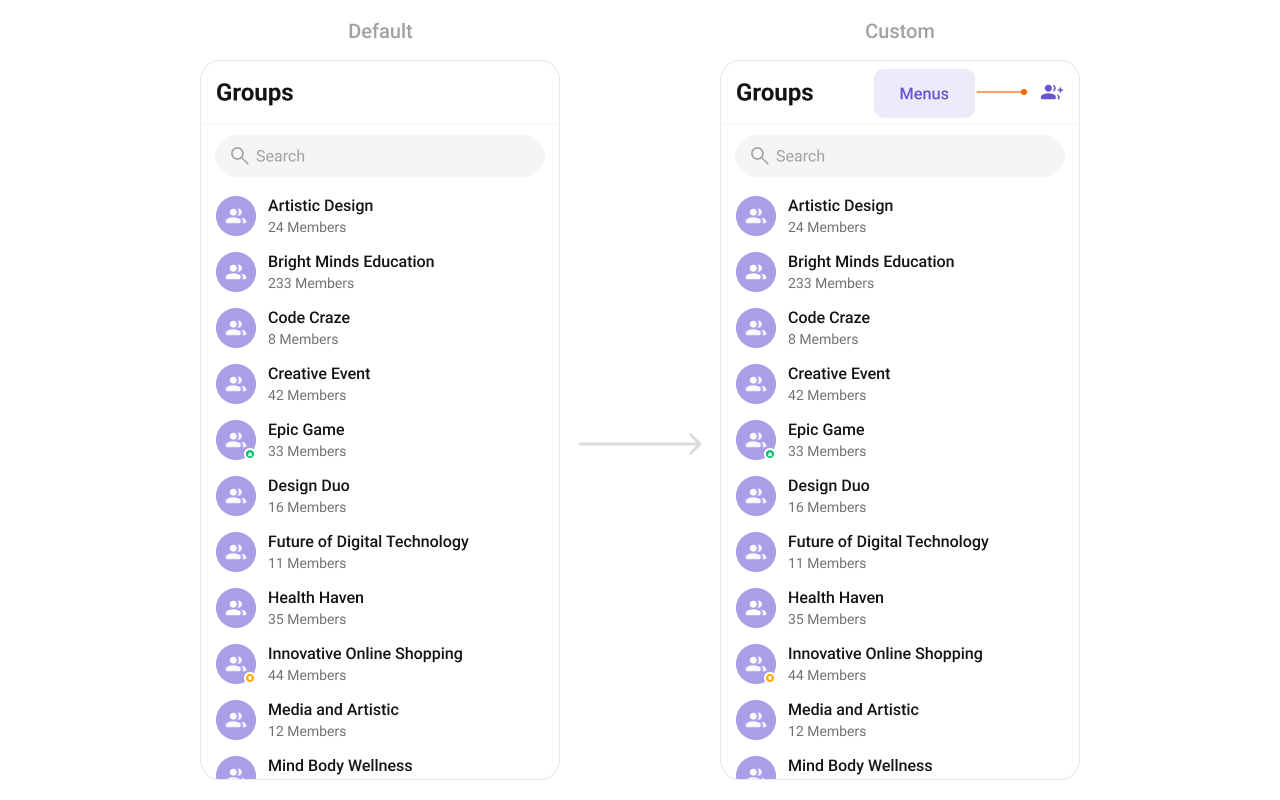
Create an overflow_menu_layout.xml layout:
overflow_menu_layout.xml
<?xml version="1.0" encoding="utf-8"?>
<LinearLayout xmlns:android="http://schemas.android.com/apk/res/android"
    android:layout_width="wrap_content"
    android:layout_height="wrap_content"
    android:orientation="vertical">

    <ImageView
        android:id="@+id/ivMenu"
        android:layout_width="@dimen/cometchat_24dp"
        android:layout_height="@dimen/cometchat_24dp"
        android:layout_marginStart="@dimen/cometchat_margin_4"
        android:importantForAccessibility="no"
        android:src="@drawable/ic_create_group" />

</LinearLayout>
YourActivity.kt
val view: View = layoutInflater.inflate(R.layout.overflow_menu_layout, null)
val imgRefresh = view.findViewById<ImageView>(R.id.ivMenu)
imgRefresh.setOnClickListener { v: View? ->
    Toast.makeText(requireContext(), "Clicked on Refresh", Toast.LENGTH_SHORT).show()
}
cometchatGroups.setOverflowMenu(view)
  • Verify: After setting any custom view slot, confirm the custom view renders in the correct position within the group list item, and the data binding populates correctly for each group.

Common Patterns

Hide all chrome — minimal list

cometchatGroups.setGroupTypeVisibility(View.GONE)
cometchatGroups.setSeparatorVisibility(View.GONE)
cometchatGroups.setToolbarVisibility(View.GONE)

Joined groups only

val builder = GroupsRequestBuilder()
    .joinedOnly(true)
cometchatGroups.setGroupsRequestBuilder(builder)

Filter by tags

val builder = GroupsRequestBuilder()
    .setTags(listOf("vip", "premium"))
cometchatGroups.setGroupsRequestBuilder(builder)

Advanced Methods

Programmatic Selection

selectGroup

Programmatically selects or deselects a group. Works with both SINGLE and MULTIPLE selection modes.
// Select a group in single-select mode
cometchatGroups.selectGroup(group, UIKitConstants.SelectionMode.SINGLE)

// Select a group in multi-select mode
cometchatGroups.selectGroup(group, UIKitConstants.SelectionMode.MULTIPLE)
In SINGLE mode, selecting a new group replaces the previous selection. In MULTIPLE mode, calling this on an already-selected group deselects it (toggle behavior).

clearSelection

Clears all selected groups and resets the selection UI.
cometchatGroups.clearSelection()

getSelectedGroups

Returns the list of currently selected Group objects.
val selected = cometchatGroups.selectedGroups

Selected Groups List

When using multi-select mode, a horizontal list of selected groups can be shown above the main list.
MethodTypeDescription
setSelectedGroupsListVisibilityint (View.VISIBLE / View.GONE)Show or hide the selected groups strip
setSelectedGroupAvatarStyle@StyleRes intAvatar style for selected group chips
setSelectedGroupItemTextColor@ColorInt intText color for selected group names
setSelectedGroupItemTextAppearance@StyleRes intText appearance for selected group names
setSelectedGroupItemRemoveIconDrawableIcon for the remove button on each chip
setSelectedGroupItemRemoveIconTint@ColorInt intTint color for the remove icon

Search Input Customization

The built-in search box can be customized programmatically:
MethodTypeDescription
setSearchPlaceholderTextStringSets the placeholder text for the search input
setSearchInputTextColor@ColorInt intText color of the search input
setSearchInputTextAppearance@StyleRes intText appearance of the search input
setSearchInputPlaceHolderTextColor@ColorInt intPlaceholder text color
setSearchInputPlaceHolderTextAppearance@StyleRes intPlaceholder text appearance
setSearchInputIconDrawableLeading icon in the search box
setSearchInputIconTint@ColorInt intTint for the leading icon
setSearchInputEndIconDrawableTrailing icon in the search box
setSearchInputEndIconTint@ColorInt intTint for the trailing icon
setSearchInputStrokeWidth@Dimension intStroke width of the search box border
setSearchInputStrokeColor@ColorInt intStroke color of the search box border
setSearchInputBackgroundColor@ColorInt intBackground color of the search box
setSearchInputCornerRadius@Dimension intCorner radius of the search box

Internal Access

These methods provide direct access to internal components for advanced use cases.
MethodReturnsDescription
getBinding()CometchatGroupListBindingThe ViewBinding for the component’s root layout
getViewModel()GroupsViewModelThe ViewModel managing group data and state
getAdapter()GroupsAdapterThe adapter powering the RecyclerView
setAdapter(GroupsAdapter)voidReplaces the default adapter with a custom one
Use these only when the standard API is insufficient. Directly manipulating the adapter or ViewModel may conflict with the component’s internal state management.

Style

The component uses XML theme styles. Define a custom style with parent CometChatGroupsStyle in themes.xml, then apply with setStyle().
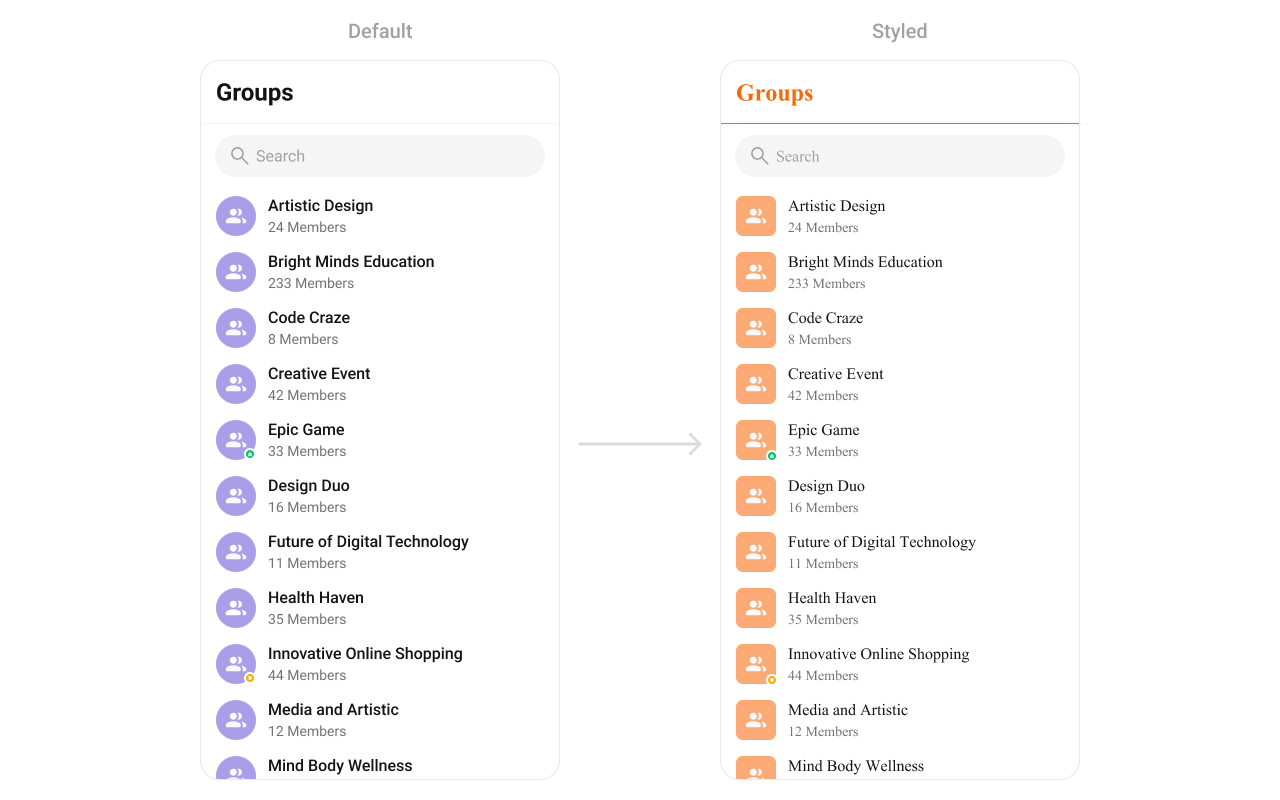
themes.xml
    <style name="CustomAvatarStyle" parent="CometChatAvatarStyle">
        <item name="cometchatAvatarStrokeRadius">8dp</item>
        <item name="cometchatAvatarBackgroundColor">#FBAA75</item>
    </style>
    <style name="CustomGroupsStyle" parent="CometChatGroupsStyle">
        <item name="cometchatGroupsAvatar">@style/CustomAvatarStyle</item>
        <item name="cometchatGroupsSeparatorColor">#F76808</item>
        <item name="cometchatGroupsTitleTextColor">#F76808</item>
    </style>
cometchatGroups.setStyle(R.style.CustomGroupsStyle)
To know more such attributes, visit the attributes file.

Programmatic Style Properties

In addition to XML theme styles, the component exposes programmatic setters for fine-grained control:
MethodTypeDescription
setBackgroundColor@ColorInt intBackground color of the component
setBackIconTint@ColorInt intTint color for the back icon
setBackIconDrawableCustom back icon drawable
setTitleTextColor@ColorInt intTitle text color in the toolbar
setTitleTextAppearance@StyleRes intTitle text appearance in the toolbar
setItemTitleTextColor@ColorInt intText color for group item titles
setItemTitleTextAppearance@StyleRes intText appearance for group item titles
setItemBackgroundColor@ColorInt intBackground color for list items
setItemSelectedBackgroundColor@ColorInt intBackground color for selected list items
setSeparatorColor@ColorInt intColor of list item separators
setStrokeColor@ColorInt intStroke color of the component border
setStrokeWidth@Dimension intStroke width of the component border
setCornerRadius@Dimension intCorner radius of the component
setSubtitleTextColor@ColorInt intText color for group item subtitles
setSubtitleTextAppearance@StyleRes intText appearance for group item subtitles
setEmptyStateTextColor@ColorInt intTitle text color for the empty state
setEmptyStateTextAppearance@StyleRes intTitle text appearance for the empty state
setEmptyStateSubtitleTextColor@ColorInt intSubtitle text color for the empty state
setEmptyStateSubTitleTextAppearance@StyleRes intSubtitle text appearance for the empty state
setErrorStateTextColor@ColorInt intTitle text color for the error state
setErrorStateTextAppearance@StyleRes intTitle text appearance for the error state
setErrorStateSubtitleColor@ColorInt intSubtitle text color for the error state
setErrorStateSubtitleTextAppearance@StyleRes intSubtitle text appearance for the error state
setRetryButtonTextColor@ColorInt intText color for the retry button
setRetryButtonTextAppearance@StyleRes intText appearance for the retry button
setRetryButtonBackgroundColor@ColorInt intBackground color for the retry button
setRetryButtonStrokeColor@ColorInt intStroke color for the retry button
setRetryButtonStrokeWidth@Dimension intStroke width for the retry button
setRetryButtonCornerRadius@Dimension intCorner radius for the retry button
setAvatarStyle@StyleRes intStyle for group avatars
setStatusIndicatorStyle@StyleRes intStyle for group type status indicators

Checkbox Style Properties (Selection Mode)

When using SINGLE or MULTIPLE selection mode, checkboxes appear on each item:
MethodTypeDescription
setCheckBoxStrokeWidth@Dimension intStroke width of the checkbox border
setCheckBoxCornerRadius@Dimension intCorner radius of the checkbox
setCheckBoxStrokeColor@ColorInt intStroke color of the checkbox border
setCheckBoxBackgroundColor@ColorInt intBackground color of unchecked checkbox
setCheckBoxCheckedBackgroundColor@ColorInt intBackground color of checked checkbox
setCheckBoxSelectIconDrawableIcon shown when checkbox is checked
setCheckBoxSelectIconTint@ColorInt intTint for the checkbox select icon
setDiscardSelectionIconDrawableIcon for the discard selection button
setDiscardSelectionIconTint@ColorInt intTint for the discard selection icon
setSubmitSelectionIconDrawableIcon for the submit selection button
setSubmitSelectionIconTint@ColorInt intTint for the submit selection icon

Customization Matrix

What to changeWhereProperty/APIExample
Override behavior on group interactionActivity/FragmentsetOn<Event> callbackssetOnItemClick((v, pos, g) -> { ... })
Filter which groups appearActivity/FragmentsetGroupsRequestBuildersetGroupsRequestBuilder(builder)
Customize search resultsActivity/FragmentsetSearchRequestBuildersetSearchRequestBuilder(builder)
Toggle visibility of UI elementsActivity/Fragmentset<Feature>Visibility(int)setGroupTypeVisibility(View.GONE)
Replace a section of the list itemActivity/Fragmentset<Slot>ViewsetLeadingView(listener)
Change colors, fonts, spacingthemes.xmlCometChatGroupsStyle<item name="cometchatGroupsSeparatorColor">#F76808</item>
Avatar style (corner radius, background)themes.xmlcometchatGroupsAvatar<item name="cometchatAvatarStrokeRadius">8dp</item>
Apply a custom styleActivity/FragmentsetStyle(int styleRes)cometchatGroups.setStyle(R.style.CustomGroupsStyle);
Back button visibilityActivity/FragmentsetBackIconVisibility(int).setBackIconVisibility(View.VISIBLE);
Toolbar visibilityActivity/FragmentsetToolbarVisibility(int).setToolbarVisibility(View.GONE);
Error state visibilityActivity/FragmentsetErrorStateVisibility(int).setErrorStateVisibility(View.GONE);
Empty state visibilityActivity/FragmentsetEmptyStateVisibility(int).setEmptyStateVisibility(View.GONE);
Loading state visibilityActivity/FragmentsetLoadingStateVisibility(int).setLoadingStateVisibility(View.GONE);
Separator visibilityActivity/FragmentsetSeparatorVisibility(int).setSeparatorVisibility(View.GONE);
Group type indicator visibilityActivity/FragmentsetGroupTypeVisibility(int).setGroupTypeVisibility(View.GONE);
Selection mode (single/multiple)Activity/FragmentsetSelectionMode(SelectionMode).setSelectionMode(UIKitConstants.SelectionMode.MULTIPLE);
Search keywordActivity/FragmentsetSearchKeyword(String).setSearchKeyword("design");
Search box visibilityActivity/FragmentsetSearchBoxVisibility(int).setSearchBoxVisibility(View.GONE);
Custom toolbar titleActivity/FragmentsetTitleText(String).setTitleText("My Groups");
Title visibilityActivity/FragmentsetTitleVisibility(int).setTitleVisibility(View.GONE);
Search placeholderActivity/FragmentsetSearchPlaceholderText(String).setSearchPlaceholderText("Find groups...");
Long-press options (replace)Activity/FragmentsetOptions(Function2)See setOptions code above
Long-press options (append)Activity/FragmentaddOptions(Function2)See addOptions code above
Loading viewActivity/FragmentsetLoadingView(int).setLoadingView(R.layout.your_loading_view);
Empty viewActivity/FragmentsetEmptyView(int).setEmptyView(R.layout.your_empty_view);
Error viewActivity/FragmentsetErrorView(int).setErrorView(R.layout.your_error_view);
Leading view (avatar area)Activity/FragmentsetLeadingView(GroupsViewHolderListener)See setLeadingView code above
Title viewActivity/FragmentsetTitleView(GroupsViewHolderListener)See setTitleView code above
Trailing viewActivity/FragmentsetTrailingView(GroupsViewHolderListener)See setTrailingView code above
Entire list itemActivity/FragmentsetItemView(GroupsViewHolderListener)See setItemView code above
Subtitle viewActivity/FragmentsetSubtitleView(GroupsViewHolderListener)See setSubtitleView code above
Overflow menuActivity/FragmentsetOverflowMenu(View)cometchatGroups.setOverflowMenu(view);
Programmatic selectionActivity/FragmentselectGroup(Group, SelectionMode).selectGroup(group, SelectionMode.SINGLE);
Clear selectionActivity/FragmentclearSelection().clearSelection();
Selected groups stripActivity/FragmentsetSelectedGroupsListVisibility(int).setSelectedGroupsListVisibility(View.VISIBLE);
Internal adapter accessActivity/FragmentgetAdapter() / setAdapter()Advanced use only

Accessibility

The component renders a scrollable RecyclerView of interactive group items. Each group row responds to tap and long-press gestures. Avatar images include the group name as content description. Group type indicators (public, private, password-protected) provide visual differentiation. For custom views provided via setLeadingView, setTitleView, setTrailingView, or setItemView, ensure you set android:contentDescription on visual-only elements so TalkBack can announce them. The default views handle this automatically. Group type status dots are visual-only by default. If screen reader descriptions are needed, provide them via a custom view with appropriate contentDescription attributes.

Next Steps