

AI Agent Component Spec
AI Agent Component Spec
Where It Fits
CometChatCallLogs is a list component. It renders all call logs for the logged-in user and emits the selected CallLog via setOnItemClick. Wire it to a call detail screen or use setOnCallIconClickListener to initiate a callback.
- Kotlin
- Java
CallDetailActivity.kt
Quick Start
Add the component to your layout XML:layout_activity.xml
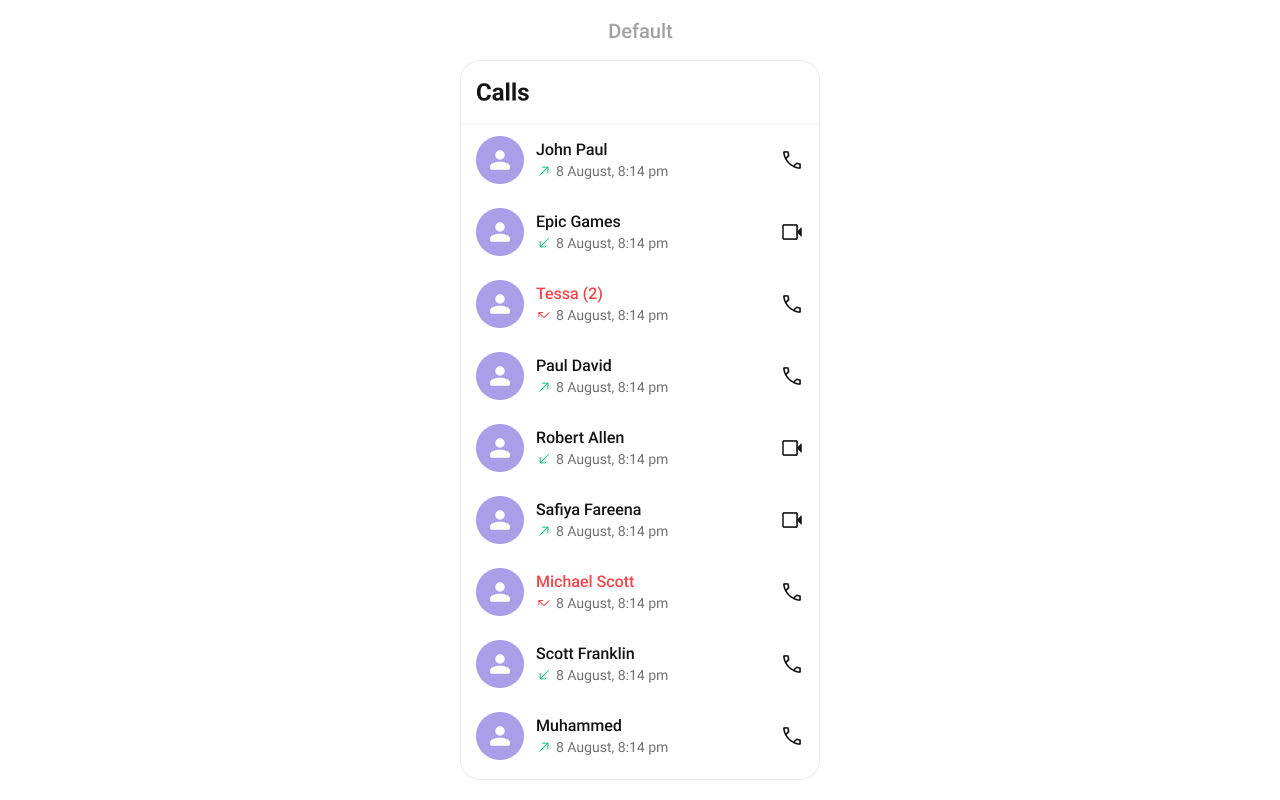
CometChatUIKit.init(), a user logged in, and the cometchat-chat-uikit-android dependency added.
To add programmatically in an Activity:
- Kotlin
- Java
YourActivity.kt
- Kotlin
- Java
YourFragment.kt
Filtering Call Logs
Pass aCallLogRequest.CallLogRequestBuilder to setCallLogRequestBuilder. Pass the builder instance — not the result of .build().
- Kotlin
- Java
Filter Recipes
| Recipe | Code |
|---|---|
| Limit to 20 per page | builder.setLimit(20) |
| Audio calls only | builder.setCallType(CometChatCallsConstants.CALL_TYPE_AUDIO) |
| Video calls only | builder.setCallType(CometChatCallsConstants.CALL_TYPE_VIDEO) |
| Missed calls only | builder.setCallStatus(CometChatCallsConstants.CALL_STATUS_MISSED) |
| Calls with recordings | builder.setHasRecording(true) |
| Incoming calls only | builder.setCallDirection("incoming") |
| Outgoing calls only | builder.setCallDirection("outgoing") |
| Filter by user UID | builder.setUid("uid1") |
| Filter by group GUID | builder.setGuid("guid1") |
| Filter by call category | builder.setCallCategory("call") |
The component uses infinite scroll — the next page loads as the user scrolls to the bottom.
Actions and Events
Callback Methods
setOnItemClick
Fires when a call log row is tapped. Primary navigation hook — use to open a call detail screen.
- Kotlin
- Java
YourActivity.kt
What this does: Replaces the default item-click behavior. When a user taps a call log entry, your custom lambda executes instead of the built-in navigation.
setOnItemLongClick
Fires when a call log row is long-pressed. Use for additional actions like delete or call back.
- Kotlin
- Java
YourActivity.kt
setOnBackPressListener
Fires when the user presses the back button in the app bar. Default: navigates to the previous activity.
- Kotlin
- Java
YourActivity.kt
setOnCallIconClickListener
Fires when the user taps the audio or video call icon on a call log item. Use to initiate a call or navigate to a call screen.
Interface: void onCallIconClick(View view, CallLogsAdapter.CallLogsViewHolder holder, int position, CallLog callLog)
- Kotlin
- Java
YourActivity.kt
setOnError
Fires on internal errors (network failure, auth issue, SDK exception).
- Kotlin
- Java
YourActivity.kt
setOnLoad
Fires when the list is successfully fetched and loaded.
- Kotlin
- Java
YourActivity.kt
setOnEmpty
Fires when the list is empty, enabling custom handling such as showing a placeholder.
- Kotlin
- Java
YourActivity.kt
- Verify: After setting an action callback, trigger the corresponding user interaction (tap, long-press, back, call icon) and confirm your custom logic executes instead of the default behavior.
Global UI Events
TheCometChatCallLogs component does not have any exposed global UI events.
SDK Events (Real-Time, Automatic)
TheCometChatCallLogs component does not listen to any SDK events internally. Call logs are fetched on load and can be refreshed manually with refreshCallLogs().
Functionality
Small functional customizations such as toggling visibility of UI elements.| Methods | Description | Code |
|---|---|---|
setToolbarVisibility | Toggles visibility for the toolbar in the app bar | .setToolbarVisibility(View.GONE); |
setBackIconVisibility | Toggles visibility for the back button in the app bar | .setBackIconVisibility(View.VISIBLE); |
setLoadingStateVisibility | Hides the loading state while fetching call logs | .setLoadingStateVisibility(View.GONE); |
setErrorStateVisibility | Hides the error state on fetching call logs | .setErrorStateVisibility(View.GONE); |
setEmptyStateVisibility | Hides the empty state on fetching call logs | .setEmptyStateVisibility(View.GONE); |
setSeparatorVisibility | Controls visibility of separators in the list view | .setSeparatorVisibility(View.GONE); |
setTitleVisibility | Controls visibility of the title in the toolbar | .setTitleVisibility(View.GONE); |
- Verify: After calling a visibility method, confirm the corresponding UI element is shown or hidden.
Custom View Slots
Each slot replaces a section of the default UI. Slots that accept aCallLog parameter receive the call log object for that row via the CallLogsViewHolderListener pattern (createView + bindView).
| Slot | Method | Replaces |
|---|---|---|
| Leading view | setLeadingView(CallLogsViewHolderListener) | Avatar / left section |
| Title view | setTitleView(CallLogsViewHolderListener) | Name / title text |
| Subtitle view | setSubtitleView(CallLogsViewHolderListener) | Subtitle text below name |
| Trailing view | setTrailingView(CallLogsViewHolderListener) | Right section |
| Item view | setItemView(CallLogsViewHolderListener) | Entire list item row |
| Loading view | setLoadingView(@LayoutRes int) | Loading spinner |
| Empty view | setEmptyView(@LayoutRes int) | Empty state |
| Error view | setErrorView(@LayoutRes int) | Error state |
| Options (replace) | setOptions(Function2) | Long-press context menu (replaces defaults) |
| Options (append) | setAddOptions(Function2) | Long-press context menu (appends to defaults) |
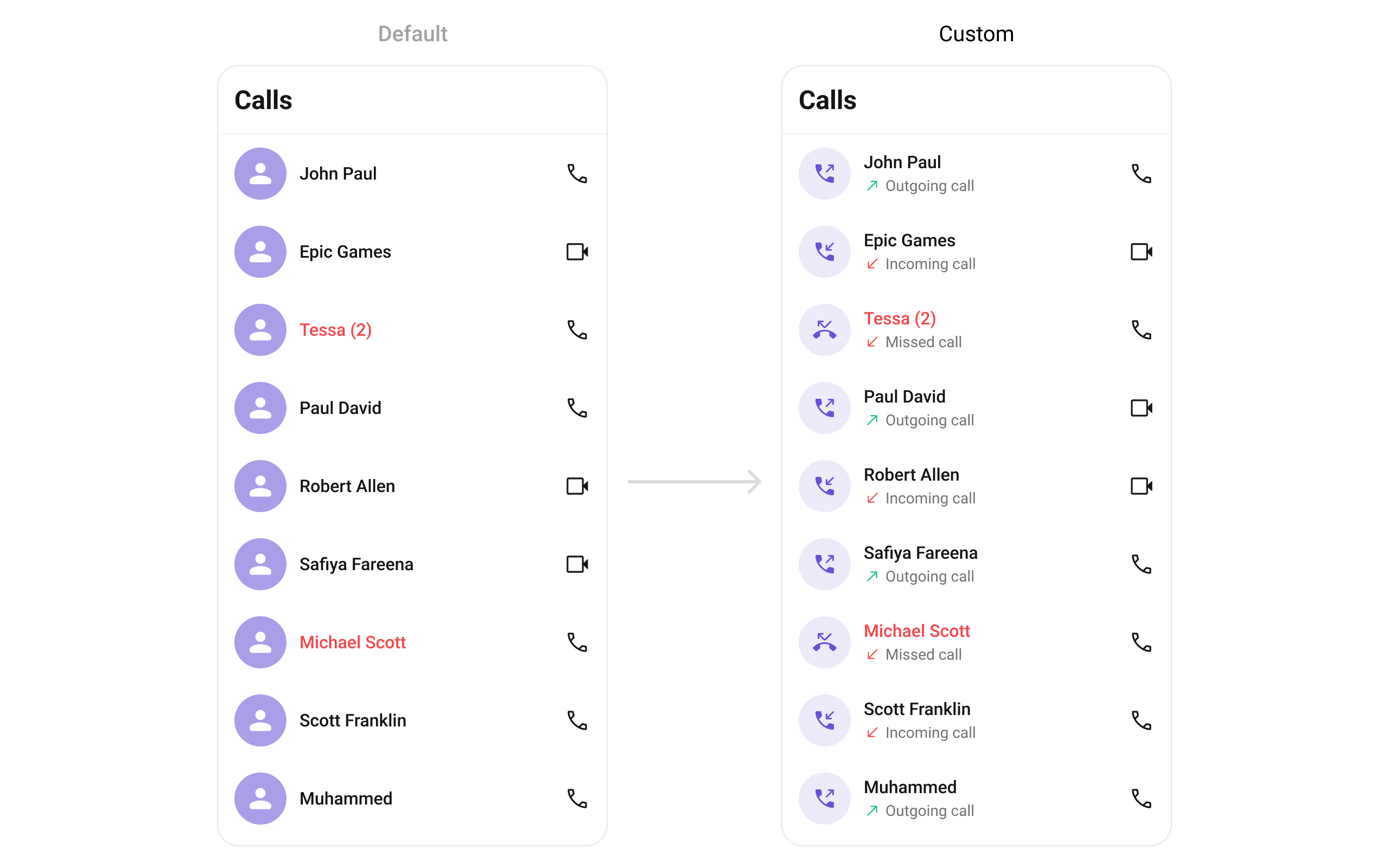
setLeadingView
Replace the avatar / left section.
- Kotlin
- Java
What this does: Registers aExample with call direction icons:CallLogsViewHolderListenerthat provides a custom view for the leading (left) area of each call log item.createViewinflates your layout, andbindViewpopulates it with call log data.
- Kotlin
- Java
YourActivity.kt
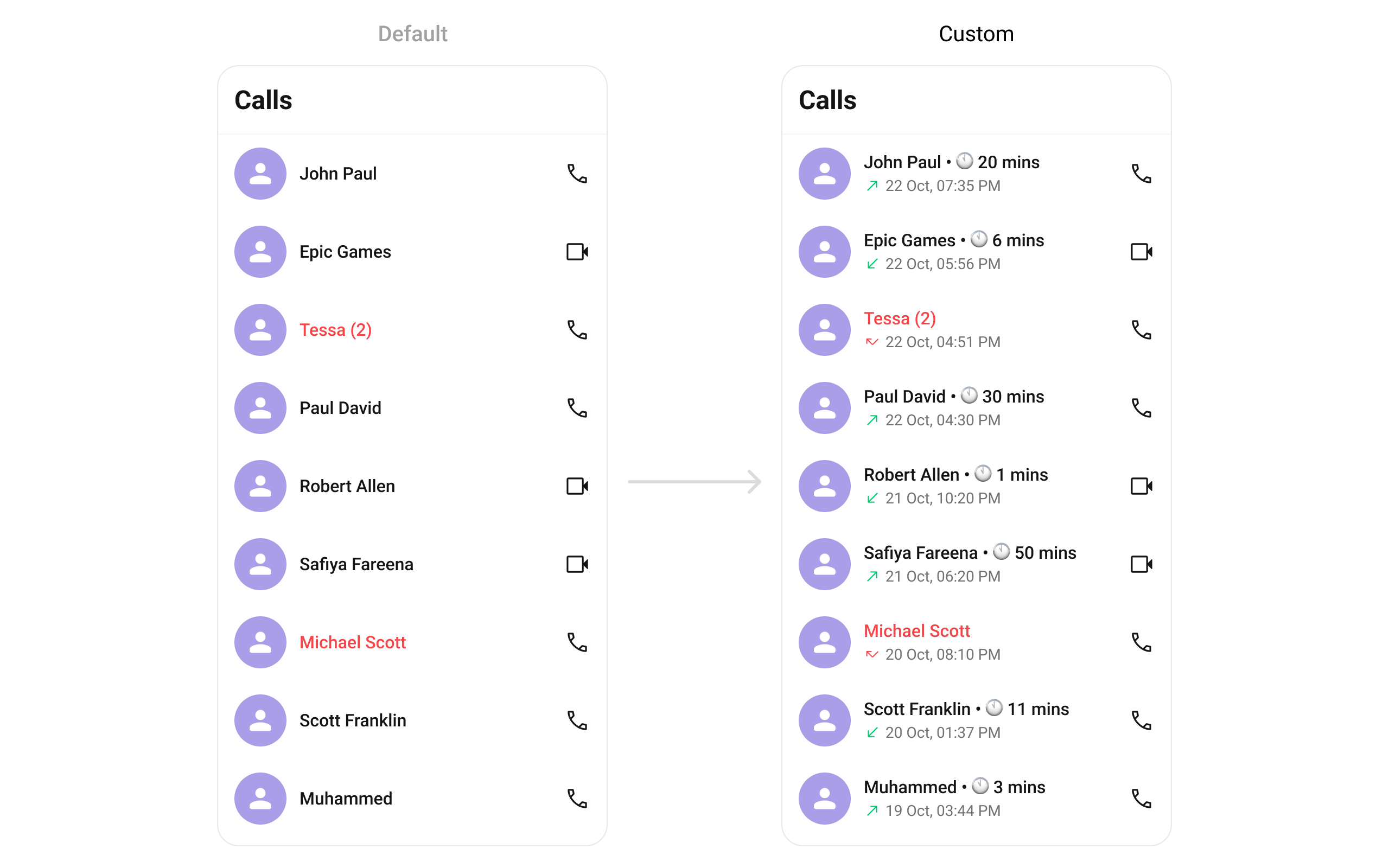
setTitleView
Replace the name / title text.
- Kotlin
- Java
- Kotlin
- Java
YourActivity.kt
setSubtitleView
Replace the subtitle text below the caller’s name.
- Kotlin
- Java

- Kotlin
- Java
YourActivity.kt
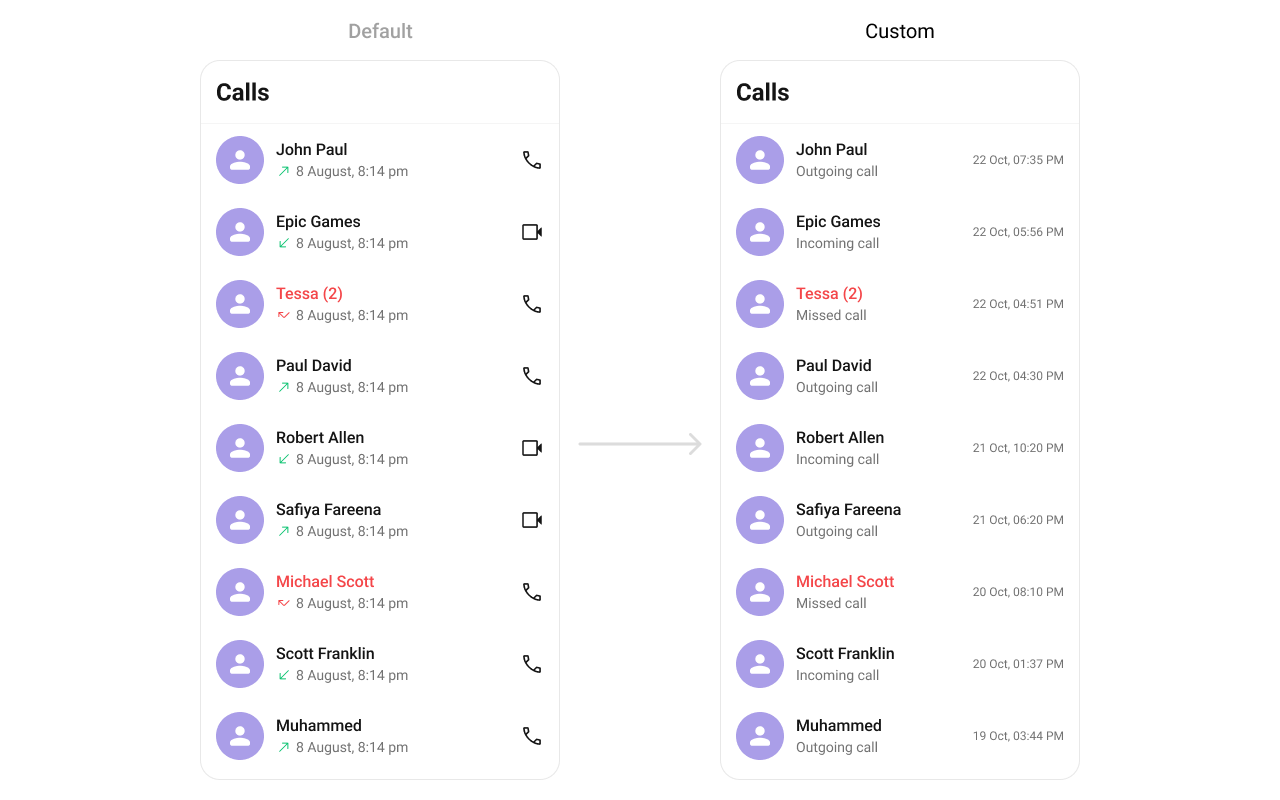
setTrailingView
Replace the right section of each call log item.
- Kotlin
- Java
- Kotlin
- Java
YourActivity.kt
setItemView
Replace the entire list item row.
- Kotlin
- Java
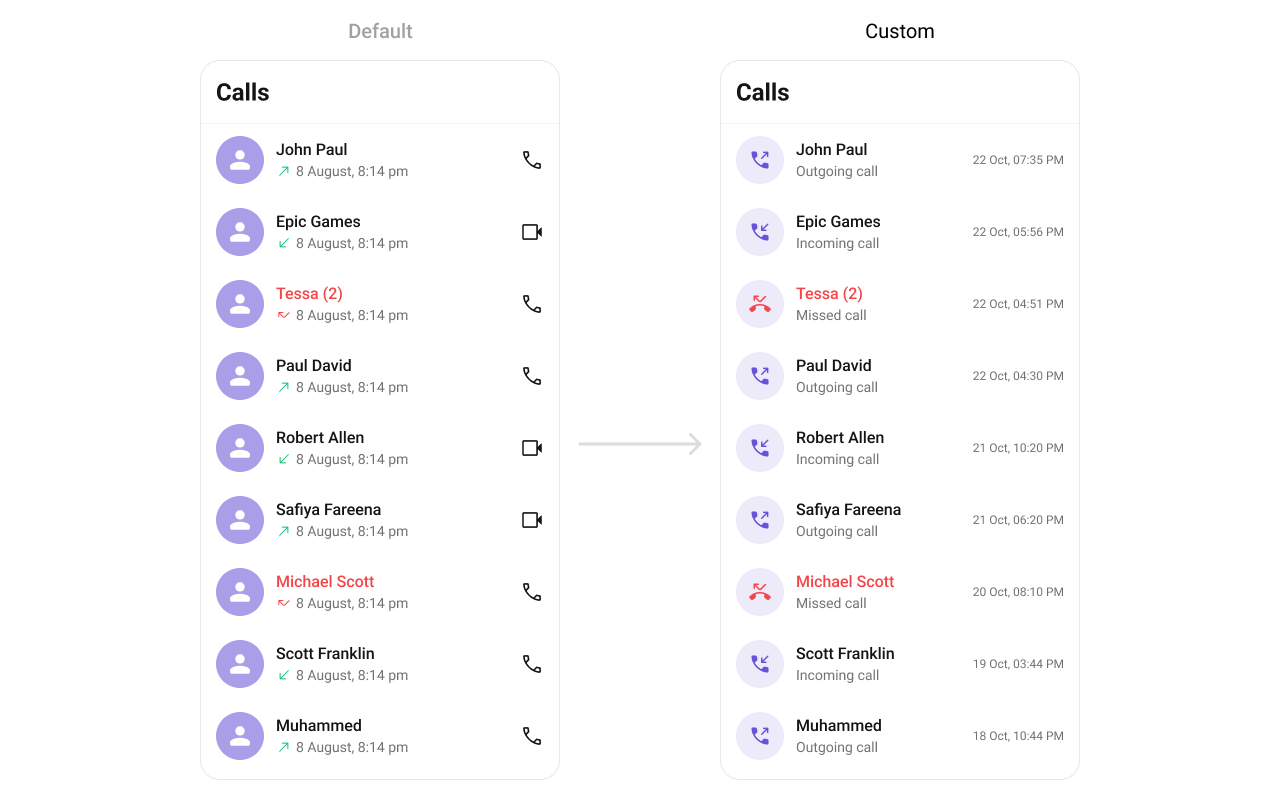
call_log_list_item.xml custom layout file:
call_log_list_item.xml
- Kotlin
- Java
YourActivity.kt
setOptions
Replace the long-press context menu entirely.
- Kotlin
- Java
setAddOptions
Append to the long-press context menu without removing defaults.
- Kotlin
- Java
setLoadingView
Sets a custom loading view displayed when data is being fetched.
- Kotlin
- Java
setEmptyView
Configures a custom view displayed when there are no call logs in the list.
- Kotlin
- Java
setErrorView
Defines a custom error state view that appears when an issue occurs while loading call logs.
- Kotlin
- Java
- Verify: After setting any custom view slot, confirm the custom view renders in the correct position within the call log list item, and the data binding populates correctly for each call log entry.
Common Patterns
Hide all chrome — minimal list
- Kotlin
- Java
Missed calls only
- Kotlin
- Java
Calls with recordings only
- Kotlin
- Java
Audio calls only
- Kotlin
- Java
Advanced Methods
refreshCallLogs
Forces a refresh of the call log list, re-fetching data from the server.
- Kotlin
- Java
setDateFormat
Sets a legacy SimpleDateFormat for call log timestamps.
- Kotlin
- Java
setDateTimeFormatter
Provides a custom implementation of DateTimeFormatterCallback to configure how time and date values are displayed. Each method corresponds to a specific case:
time(long timestamp)— Custom full timestamp formattoday(long timestamp)— Called when a call log is from todayyesterday(long timestamp)— Called for yesterday’s call logslastWeek(long timestamp)— Call logs from the past weekotherDays(long timestamp)— Older call logsminutes(long diffInMinutesFromNow, long timestamp)— e.g., “5 minutes ago”hours(long diffInHourFromNow, long timestamp)— e.g., “2 hours ago”
- Kotlin
- Java
Internal Access
These methods provide direct access to internal components for advanced use cases.| Method | Returns | Description |
|---|---|---|
getBinding() | CometchatCallLogsBinding | The ViewBinding for the component’s root layout |
getViewModel() | CallLogsViewModel | The ViewModel managing call log data and state |
getAdapter() | CallLogsAdapter | The adapter powering the RecyclerView |
setAdapter(CallLogsAdapter) | void | Replaces the default adapter with a custom one |
Use these only when the standard API is insufficient. Directly manipulating the adapter or ViewModel may conflict with the component’s internal state management.
Style
The component uses XML theme styles. Define a custom style with parentCometChatCallLogsStyle in themes.xml, then apply with setStyle().
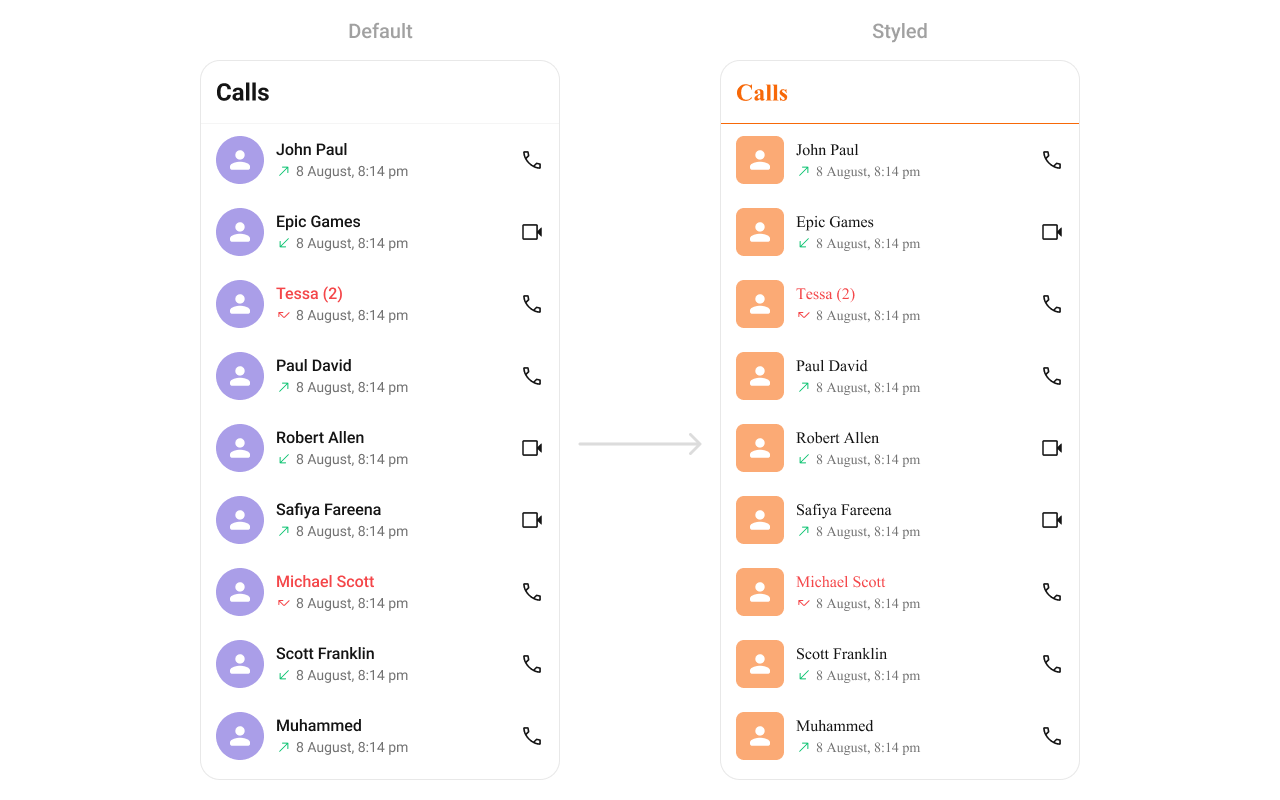
themes.xml
- Kotlin
- Java
Programmatic Style Properties
In addition to XML theme styles, the component exposes programmatic setters for fine-grained control:| Method | Type | Description |
|---|---|---|
setBackgroundColor | @ColorInt int | Background color of the component |
setCornerRadius | @Dimension int | Corner radius of the component |
setStrokeColor | @ColorInt int | Stroke color of the component border |
setStrokeWidth | @Dimension int | Stroke width of the component border |
setBackIcon | Drawable | Custom back icon drawable |
setBackIconTint | @ColorInt int | Tint color for the back icon |
setTitleTextColor | @ColorInt int | Title text color in the toolbar |
setTitleTextAppearance | @StyleRes int | Title text appearance in the toolbar |
setItemTitleTextColor | @ColorInt int | Text color for call log item titles |
setItemTitleTextAppearance | @StyleRes int | Text appearance for call log item titles |
setItemSubtitleTextColor | @ColorInt int | Text color for call log item subtitles |
setItemSubtitleTextAppearance | @StyleRes int | Text appearance for call log item subtitles |
setSeparatorColor | @ColorInt int | Color of list item separators |
setItemIncomingCallIcon | Drawable | Icon for incoming call indicators |
setItemIncomingCallIconTint | @ColorInt int | Tint for incoming call icon |
setItemOutgoingCallIcon | Drawable | Icon for outgoing call indicators |
setItemOutgoingCallIconTint | @ColorInt int | Tint for outgoing call icon |
setItemMissedCallIcon | Drawable | Icon for missed call indicators |
setItemMissedCallIconTint | @ColorInt int | Tint for missed call icon |
setItemMissedCallTitleColor | @ColorInt int | Title text color for missed call entries |
setItemAudioCallIcon | Drawable | Icon for audio call action button |
setItemAudioCallIconTint | @ColorInt int | Tint for audio call action icon |
setItemVideoCallIcon | Drawable | Icon for video call action button |
setItemVideoCallIconTint | @ColorInt int | Tint for video call action icon |
setAvatarStyle | @StyleRes int | Style for call log avatars |
setDateStyle | @StyleRes int | Style for date/time display |
setEmptyStateTitleTextAppearance | @StyleRes int | Title text appearance for the empty state |
setEmptyStateTitleTextColor | @ColorInt int | Title text color for the empty state |
setEmptyStateSubtitleTextAppearance | @StyleRes int | Subtitle text appearance for the empty state |
setEmptyStateSubtitleTextColor | @ColorInt int | Subtitle text color for the empty state |
setErrorTitleTextAppearance | @StyleRes int | Title text appearance for the error state |
setErrorTitleTextColor | @ColorInt int | Title text color for the error state |
setErrorSubtitleTextAppearance | @StyleRes int | Subtitle text appearance for the error state |
setErrorSubtitleTextColor | @ColorInt int | Subtitle text color for the error state |
Customization Matrix
| What to change | Where | Property/API | Example |
|---|---|---|---|
| Override behavior on user interaction | Activity/Fragment | setOn<Event> callbacks | setOnItemClick((v, pos, cl) -> { ... }) |
| Filter which call logs appear | Activity/Fragment | setCallLogRequestBuilder | setCallLogRequestBuilder(builder) |
| Toggle visibility of UI elements | Activity/Fragment | set<Feature>Visibility(int) | setSeparatorVisibility(View.GONE) |
| Replace a section of the list item | Activity/Fragment | set<Slot>View | setLeadingView(listener) |
| Change colors, fonts, spacing | themes.xml | CometChatCallLogsStyle | <item name="cometchatCallLogsSeparatorColor">#F76808</item> |
| Avatar style (corner radius, background) | themes.xml | cometchatCallLogsAvatarStyle | <item name="cometchatAvatarStrokeRadius">8dp</item> |
| Apply a custom style | Activity/Fragment | setStyle(int styleRes) | cometchatCallLogs.setStyle(R.style.CustomCallLogStyle); |
| Back button visibility | Activity/Fragment | setBackIconVisibility(int) | .setBackIconVisibility(View.VISIBLE); |
| Toolbar visibility | Activity/Fragment | setToolbarVisibility(int) | .setToolbarVisibility(View.GONE); |
| Title visibility | Activity/Fragment | setTitleVisibility(int) | .setTitleVisibility(View.GONE); |
| Error state visibility | Activity/Fragment | setErrorStateVisibility(int) | .setErrorStateVisibility(View.GONE); |
| Empty state visibility | Activity/Fragment | setEmptyStateVisibility(int) | .setEmptyStateVisibility(View.GONE); |
| Loading state visibility | Activity/Fragment | setLoadingStateVisibility(int) | .setLoadingStateVisibility(View.GONE); |
| Separator visibility | Activity/Fragment | setSeparatorVisibility(int) | .setSeparatorVisibility(View.GONE); |
| Date/time formatting | Activity/Fragment | setDateTimeFormatter(DateTimeFormatterCallback) | See setDateTimeFormatter code above |
| Legacy date format | Activity/Fragment | setDateFormat(SimpleDateFormat) | setDateFormat(new SimpleDateFormat("dd/MM/yyyy, HH:mm:ss")) |
| Long-press options (replace) | Activity/Fragment | setOptions(Function2) | See setOptions code above |
| Long-press options (append) | Activity/Fragment | setAddOptions(Function2) | See setAddOptions code above |
| Loading view | Activity/Fragment | setLoadingView(int) | .setLoadingView(R.layout.your_loading_view); |
| Empty view | Activity/Fragment | setEmptyView(int) | .setEmptyView(R.layout.your_empty_view); |
| Error view | Activity/Fragment | setErrorView(int) | .setErrorView(R.layout.your_error_view); |
| Leading view (avatar area) | Activity/Fragment | setLeadingView(CallLogsViewHolderListener) | See setLeadingView code above |
| Title view | Activity/Fragment | setTitleView(CallLogsViewHolderListener) | See setTitleView code above |
| Subtitle view | Activity/Fragment | setSubtitleView(CallLogsViewHolderListener) | See setSubtitleView code above |
| Trailing view | Activity/Fragment | setTrailingView(CallLogsViewHolderListener) | See setTrailingView code above |
| Entire list item | Activity/Fragment | setItemView(CallLogsViewHolderListener) | See setItemView code above |
| Call icon click listener | Activity/Fragment | setOnCallIconClickListener(OnCallIconClick) | See setOnCallIconClickListener code above |
| Refresh call logs | Activity/Fragment | refreshCallLogs() | .refreshCallLogs(); |
| Internal adapter access | Activity/Fragment | getAdapter() / setAdapter() | Advanced use only |
Accessibility
The component renders a scrollableRecyclerView of interactive call log items. Each call log row responds to tap and long-press gestures. Avatar images include the caller name as content description. Call status icons (incoming, outgoing, missed) provide visual indicators for call direction.
For custom views provided via setLeadingView, setTitleView, setTrailingView, or setItemView, ensure you set android:contentDescription on visual-only elements so TalkBack can announce them. The default views handle this automatically.
Call direction icons and status indicators are visual-only by default. If screen reader descriptions are needed, provide them via a custom view with appropriate contentDescription attributes.