

AI Agent Component Spec
AI Agent Component Spec
| Field | Value |
|---|---|
| Package | com.cometchat:chat-uikit-android |
| Import | com.cometchat.chatuikit.resources.localize.CometChatLocalize |
| Set language | CometChatLocalize.setLocale(context, Language.Code.fr) |
| Get language | CometChatLocalize.getLocale(context) |
| Supported languages | 19: ar, de, en, es, fr, hi, hu, it, ja, ko, lt, ms, nl, pt, ru, sv, tr, zh, zh-TW |
| Override labels | res/values/strings.xml — override UI Kit string resource keys |
| Date formatting | DateTimeFormatterCallback for custom date/time labels |
| Related | Theme Introduction | Sound Manager |
When to use this
- You want the UI Kit to follow the device language.
- You want to force a specific language regardless of device settings.
- You need to override default UI Kit labels with brand-specific wording.
- You want consistent date and time labels across all UI Kit screens.
Prerequisites
- CometChat UI Kit for Android is installed and initialized. Use Getting Started if needed.
- You can access an Android
Context(Activity or Application) to apply locale changes. - You can edit
res/values/strings.xmlin your app module.
Quick start
- Choose a language code from Supported languages.
- Add a locale call before you render UI Kit screens.
File:
app/src/main/java/<your_package>/LocalizeActivity.javaorapp/src/main/java/<your_package>/LocalizeActivity.kt. Use the code in Implementation > Set and read the UI Kit locale. - Override UI text keys in
res/values/strings.xmlif you need custom wording. - Rebuild and run the app.
- Verify that UI Kit labels render in the selected language and your custom strings appear.
Core concepts
CometChatLocalize: Utility class to set and read the UI Kit locale from an AndroidContext.Language.Code: Constants for supported language codes to use withsetLocale.strings.xml: Android string resources that control the visible text in UI Kit components.DateTimeFormatterCallback: Callback interface to control date and time labels like “Today” or “X mins ago”.
CometChatLocalize methods
setLocale(Context context, @Language.Code String language): Sets the UI Kit language using aLanguage.Codevalue.getLocale(Context context): Returns the current locale country code for the provided context.
Supported languages
UI Kit supports 19 languages for localization:- Arabic (
ar) - Chinese (
zh) - Chinese (Traditional) (
zh-TW) - Dutch (
nl) - English (
en) - French (
fr) - German (
de) - Hindi (
hi) - Hungarian (
hu) - Italian (
it) - Japanese (
ja) - Korean (
ko) - Lithuanian (
lt) - Malay (
ms) - Portuguese (
pt) - Russian (
ru) - Spanish (
es) - Swedish (
sv) - Turkish (
tr)
Implementation
Set and read the UI Kit locale
What you’re changing: The UI Kit language for your app session.- Where to change it: Your Activity or Application class before UI Kit screens are rendered.
- Applies to: All UI Kit screens.
- Default behavior: UI Kit uses the device locale.
-
Override: Call
CometChatLocalize.setLocale(...)with aLanguage.Codevalue. - Code:
- Kotlin
- Java
LocalizeActivity.kt
- What this does: Sets the UI Kit language to Hindi for the current context and reads the current locale value for later use.
- Verify: Launch a UI Kit screen and confirm labels display in the selected language.
Override UI Kit strings in strings.xml
What you’re changing: Visible text used by UI Kit components.
-
Where to change it:
app/src/main/res/values/strings.xmlin your app module. - Applies to: All UI Kit components that reference the string key.
-
Default behavior: UI Kit uses its internal
strings.xmlvalues. -
Override: Add the same key to your app’s
strings.xmlto override the label.
strings.xml:
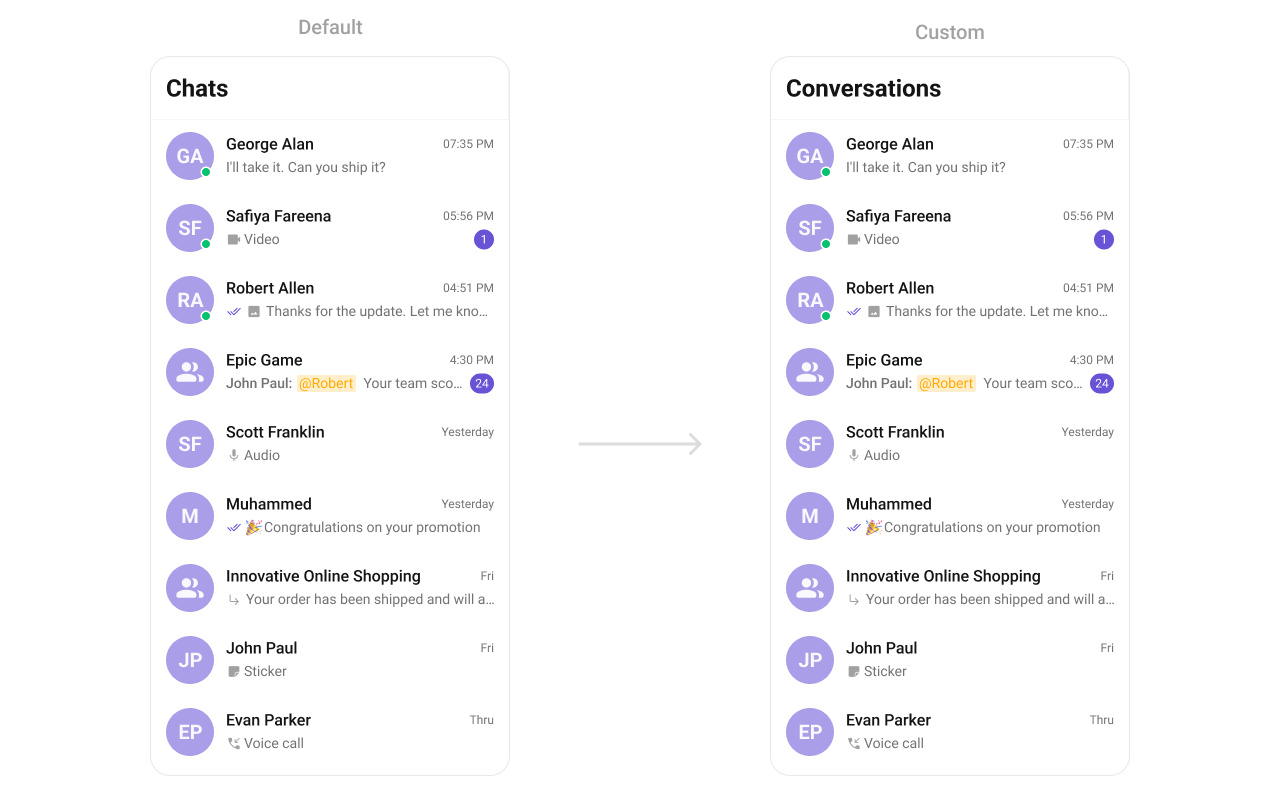
strings.xml
- What this does: Shows the default UI Kit label for the conversations list.
res/values/strings.xml
- What this does: Replaces the UI Kit label with your custom text.
- No UI Kit source code changes required.
- Easy localization using Android resources.
- UI Kit updates do not overwrite your overrides.
- You can tailor text without affecting behavior.
Customize date and time labels
What you’re changing: Global time and date labels such as “Today”, “Yesterday”, and “X mins ago”.-
Where to change it: Your UI Kit initialization (where you build
UIKitSettings). - Applies to: All UI Kit screens that display timestamps.
- Default behavior: UI Kit uses its built-in formatter.
-
Override: Provide a
DateTimeFormatterCallbackwhen buildingUIKitSettings. - Code:
- Kotlin
- Java
AppInit.kt
-
What this does: Registers a global
DateTimeFormatterCallbackso all UI Kit timestamps use your formatting rules. - Verify: Open a conversation list and confirm labels like “Today” or “X mins ago” match your formatter.
Customization matrix
| What you want to change | Where | Property/API | Example |
|---|---|---|---|
| UI Kit language (global) | app/src/main/java/<your_package>/LocalizeActivity.java | CometChatLocalize.setLocale(Context, Language.Code) | CometChatLocalize.setLocale(this, Language.Code.hi); |
| Read current locale (optional) | app/src/main/java/<your_package>/LocalizeActivity.java | CometChatLocalize.getLocale(Context) | String currentLocale = CometChatLocalize.getLocale(this); |
| UI Kit label text (strings.xml) | app/src/main/res/values/strings.xml | cometchat_chats | <string name="cometchat_chats" translatable="true">Conversations</string> |
| Global date and time labels | app/src/main/java/<your_package>/AppInit.java | setDateTimeFormatterCallback(...) | .setDateTimeFormatterCallback(new DateTimeFormatterCallback() { |